


 Unity
Unity Unreal
 Godot
Godot
 Mobile
 PC
PC Console
 Full-Cycle
 Co-Development
 Outstaffing






-
 Unreal Game Development
 Aug 18th, 2026
- Share:
Table of Contents
- TL;DR
- Why the Blueprint/C++ split is an architecture decision, not a language preference
- Which performs better, Blueprints or C++?
- Which lets your team iterate faster, Blueprints or C++?
- Does your team's skill mix change the answer?
- Blueprints vs C++: side-by-side comparison
- How do you decide the split for your project?
- What this means for your budget, timeline, and team
- Conclusion: Draw the line by workload, not by language preference
If you’re scoping an Unreal Engine project, staffing a team, or evaluating a development partner, the Blueprint-vs-C++ question is really a question about where your budget goes and how fast your team can move. A studio that treats this as a binary choice usually ends up either underperforming on frame budget or bottlenecking every gameplay tweak behind a programmer. The right answer is almost always a deliberate mix, and the mix should be decided by what the code does, not by who’s most comfortable writing it. Below is the framework production teams actually use to draw that line, backed by Epic’s own architecture guidance and current studio adoption data.
TL;DR
- Get the split wrong and it costs you: shipped framerate loss from leaning too hard on Blueprint for systems-level logic, or wasted programmer hours on trivial tuning that belongs with a designer.
- C++ builds the engine-level systems; Blueprint scripts the behavior on top of them. The real decision is where that line sits on your project, not which one wins outright.
- C++ is faster at runtime because it compiles to machine code; Blueprint runs on a virtual machine and carries execution overhead. Epic’s own engineering team confirms this but also confirms the gap is “usually insignificant” outside tight loops, large data sets, and per-instance tick logic.
- Blueprint wins on iteration speed. No recompile, no relink, changes are visible in seconds, which matters more than raw performance during prototyping and content-heavy production.
- Nearly every shipped Unreal Engine title uses both. Unreal Engine is now the primary engine for 42% of surveyed developers, and adoption climbs to 59% at AA studios and 47% at AAA studios, where hybrid C++/Blueprint pipelines are close to standard practice.
Why the Blueprint/C++ split is an architecture decision, not a language preference
Blueprint is Unreal’s visual scripting system: you wire logic together with nodes instead of writing lines of code. C++ is the engine’s native programming language, the same language Epic used to build Unreal itself. Epic’s own documentation frames the distinction more precisely as programming versus scripting: programming defines systems, and scripting defines behaviors by interfacing with systems that already exist. A vehicle system’s acceleration and steering logic is programming; a specific car or boat built from that system is scripting.
In practice the line blurs constantly, C++ can define one-off behaviors and Blueprint can absolutely define systems, which is exactly why this isn’t a language preference. Every Blueprint class ultimately calls down into C++, because Blueprint is an interface layer over engine functionality that Epic (or your own programmers) expose. So the real question a project has to answer isn’t “Blueprint or C++” as a style choice, it’s who owns which layer: your programmers own the C++ systems underneath, and whoever you put in Blueprint owns the behavior built on top of them. Get that ownership split wrong and you don’t get a stylistic mismatch, you get a bottleneck or an unmaintainable graph.
Which performs better, Blueprints or C++?
C++ is faster, and the reason is structural, not incidental. C++ compiles directly to machine code that runs on the CPU. Blueprint compiles to bytecode that runs on a virtual machine, which adds a layer of execution overhead on every node. Epic’s own coding documentation is direct about this: “Fundamentally, C++ is more performant than Blueprint.”
Where the gap actually shows up
The overhead is real, but it isn’t evenly distributed. Epic flags five specific contexts where the performance difference becomes significant: core low-level infrastructure, tight loops with heavy I/O or processing, systems handling large data sets, Tick-dependent classes with many active instances, and anything that would benefit from multithreading (Blueprint doesn’t support it at all). Outside those contexts, Epic’s own guidance is that the difference between Blueprint and C++ is “usually insignificant.”
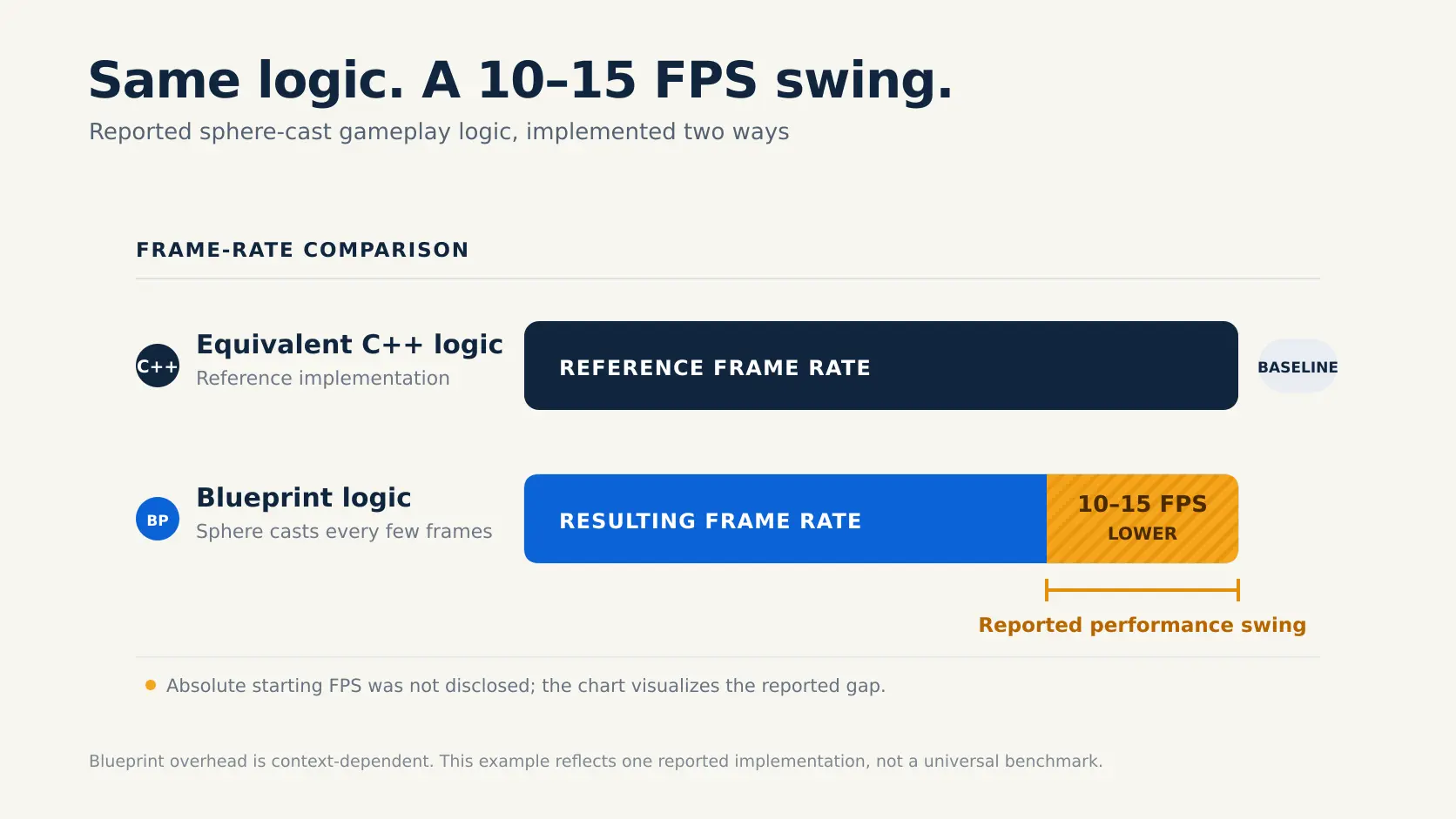
Real production incidents back this up. One indie developer building in UE5 added a Blueprint function that ran sphere casts every few frames, standard gameplay logic. Once it was wired into the live game, the frame budget dropped by 10 to 15 FPS. The exact same logic rewritten in C++ made no measurable dent in framerate at all. The lesson wasn’t “avoid Blueprint”; it was that repeated per-frame work on many actor instances is precisely the scenario where the VM overhead compounds, which lines up exactly with what Epic’s documentation warns about.
 Where it genuinely doesn’t matter
Menu logic, one-off cutscene triggers, UI wiring, dialogue branching, level-specific puzzle logic, most of what a designer touches day to day, runs in Blueprint constantly in shipped AAA titles without any measurable frame cost. The performance conversation only becomes a real decision once you’re talking about systems that execute continuously across dozens or hundreds of instances, not one-time or event-driven logic. Treating every Blueprint node as a performance risk is how teams waste engineering time converting things that were never going to show up in a profiler.
Which lets your team iterate faster, Blueprints or C++?
Blueprint, without much argument. Epic lists faster iteration as one of Blueprint’s core strengths: it’s quicker to create, modify, compile, and test a Blueprint class than the equivalent C++ workflow, which requires a build step and, for larger changes, an editor restart. For prototyping, tuning gameplay feel, or adjusting a boss encounter after a playtest, that compile-and-see loop is the difference between five iterations in an afternoon and one.
This matters more than it sounds like on paper. Iteration speed compounds. A designer who can nudge a value, hit compile on a Blueprint graph, and see the result in seconds will simply try more things than one waiting on a programmer to make the change, rebuild, and hand it back. On any project where gameplay feel is being actively tuned, which is most of the production, that loop speed has a direct relationship to how many passes the team gets before ship.
C++’s iteration cost is real, but it’s not fixed. Live Coding, enabled by default on new Unreal projects, recompiles and applies most C++ changes without a full editor restart, and it’s meaningfully faster and more reliable than the Hot Reload system it replaced (Hot Reload still exists as a legacy fallback, but it has a known history of corrupting Blueprints on save, so most teams leave it off). Structure your C++ well too, small, focused classes and clear Blueprint-exposed hooks, and you’ll cut how often a change needs a full recompile at all. But even with Live Coding, C++ iteration is still slower than editing a Blueprint graph for the kind of high-frequency tuning that happens constantly during production.
Does your team's skill mix change the answer?
Yes, and this is where the decision stops being purely technical. Blueprint’s visual, node-based format is accessible to designers, artists, and technical artists who aren’t professional programmers. That’s not a consolation prize, it’s the entire point of the system: it lets people who understand gameplay feel and player experience implement and iterate on that feel directly, without a programmer as an intermediary for every small change.
C++ requires programmers, full stop, and Unreal’s flavor of C++ has its own learning curve on top of the language itself (UPROPERTY/UFUNCTION macros, the reflection system, and Unreal’s memory model). A small team without a dedicated engine programmer will lean harder on Blueprint by necessity, and that’s a legitimate scoping decision, not a compromise, as long as the team is honest about where that creates risk (see the performance contexts above).
For AA and AAA studios, and for outsourced or augmented teams, the real skill-mix question is usually about role clarity: who owns the C++ foundation, and who’s authorized to build on top of it in Blueprint. Projects that skip this conversation tend to end up with either a locked-down codebase that bottlenecks every designer request or an unstructured pile of Blueprint logic that nobody can profile or maintain six months in. That’s exactly the kind of role clarity an embedded co-development team needs to establish on day one, before the codebase gets tangled, not after.
Blueprints vs C++: side-by-side comparison
| Decision factor | Blueprint | C++ |
| Runtime performance | Slower; VM/bytecode overhead, most noticeable in tight loops, large data sets, and per-instance Tick logic | Faster; compiles to native machine code |
| Iteration speed | Fast; no recompile, changes visible immediately | Slower; requires build step, live coding narrows but doesn’t close the gap |
| Who can use it | Designers, artists, technical artists, and programmers | Programmers only |
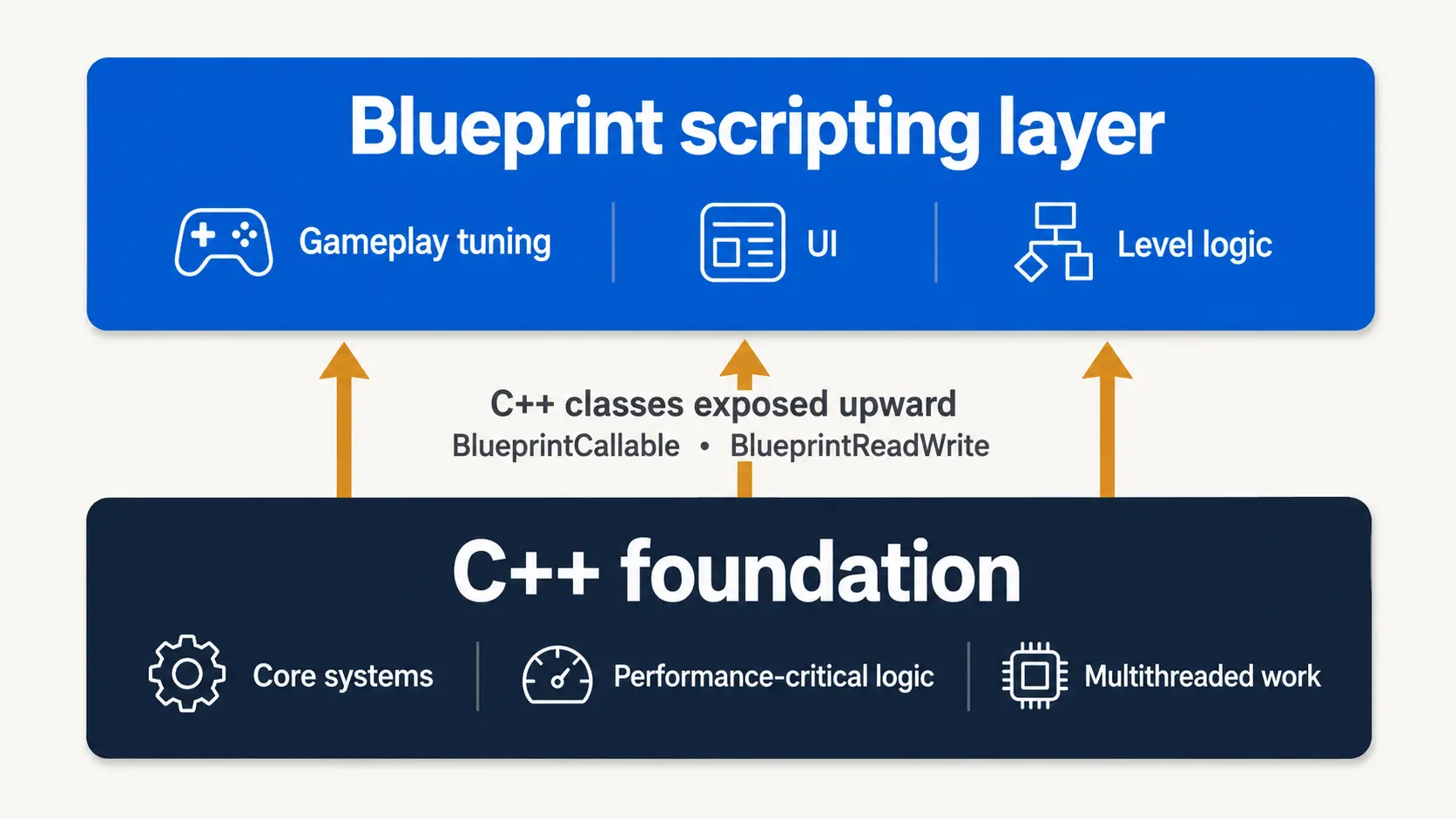
| Best for | Gameplay tuning, UI logic, level-specific scripting, rapid prototyping | Core systems, performance-critical logic, low-level engine access, multithreading |
| Multithreading support | Not supported | Fully supported |
| Debugging tools | Blueprint Debugger (less powerful) | Full native debugging toolchain |
| Version control / diffing | Difficult to diff and merge meaningfully | Text-based; diffs, merges, and code review work normally |
| Scalability of large logic | Large graphs get hard to navigate and maintain | Large C++ files are easier to structure and modify than an equivalent Blueprint graph |
| Typical role in production | Scripting layer on top of engine systems | Foundation layer the Blueprint scripting sits on |
How do you decide the split for your project?
Running both is Epic’s own recommended architecture, not a hedge: “most projects benefit from using a mix of the two,” with C++ as the foundation and Blueprint built on top, exposing functionality through UPROPERTY(BlueprintReadWrite) and UFUNCTION(BlueprintCallable) markers or shared Blueprint function libraries. The adoption data backs this up: Unreal Engine is now the primary engine for 42% of surveyed developers, according to GDC’s 2026 State of the Game Industry report, climbing to 59% at AA studios and 47% at AAA, and studios at that scale run structured hybrid pipelines, not pure-C++ or pure-Blueprint ones.
As an illustrative example (not a specific client engagement): a mid-size third-person action project might build its core combat system, inventory framework, and save/load logic in C++, since those are performance-sensitive, reused across the game, and benefit from proper version control. Enemy encounter scripting, UI flows, and level-specific triggers get built in Blueprint on top, so designers can tune pacing and UI behavior without filing a ticket every time a value needs adjusting. That split follows directly from the performance and iteration-speed tradeoffs above. Here’s how to make the same call on your own project, with three questions:
Does this system run continuously across many instances, or does it fire occasionally in response to an event? Continuous, per-instance, or Tick-dependent logic leans C++. Event-driven, occasional logic is safe in Blueprint regardless of complexity.
Who needs to iterate on this after it’s built? If a designer will be tuning this constantly through production (encounter difficulty, UI timing, ability values), it needs to be Blueprint-accessible even if the underlying system is C++. Exposing a tunable parameter from C++ to Blueprint is cheap; forcing every tuning pass through a programmer is not.
What’s the cost of getting it wrong? A slow Blueprint UI screen is a minor fix; a slow Blueprint system running per-frame across hundreds of enemies is a shipped framerate problem discovered late. Weight your caution toward wide blast radius, not toward Blueprint in general. Structured performance and build QA catches that kind of regression before it reaches players, but it’s not a substitute for getting the split right in the first place. If a specific Blueprint system is already the suspect;Epic’s own fix is to profile it with Unreal Insights and convert only what’s proven slow.
Run every system through those three questions, and the boundary draws itself; no need to default to “C++ where we can” or “Blueprint everything, optimize what breaks.”
What this means for your budget, timeline, and team
This decision has direct cost implications, which is why it belongs in project scoping, not just in engineering standups, right alongside what an Unreal project actually costs to staff in the first place. A pure-C++ approach front-loads engineering cost and slows early iteration, since every gameplay adjustment needs a programmer. A pure-Blueprint approach is faster to get moving but risks a late, expensive optimization pass once systems that should have been C++ start showing up in profiling. The hybrid model Epic recommends, and that AA/AAA studios run in practice, spreads that cost more evenly: programmers build and own the performance-critical foundation, designers iterate against it without blocking on engineering time, and the expensive C++ conversion work only happens for systems that actually need it.
If you’re scoping a project internally or evaluating an Unreal Engine development partner, the questions worth asking are less about the team’s raw C++ or Blueprint skill and more about whether they have a clear, repeatable process for deciding where that line sits on your specific project, and whether their C++ foundation is structured to expose the right hooks to Blueprint without turning into either a bottleneck or an unprofiled mess six months into production. It’s the same lens studios apply when they’re working out how to choose engines and programming languages for an outsourced production more broadly; Blueprint versus C++ is just the sharpest version of that question once you’re already inside Unreal.
Conclusion: Draw the line by workload, not by language preference
Blueprint and C++ sit at different layers of the same production pipeline. C++ gives you the performance, low-level access, and maintainability to build a solid foundation; Blueprint gives your designers and artists the speed to iterate on top of it without waiting in an engineering queue. The studios getting the most out of Unreal Engine right now, the 59% of AA studios and 47% of AAA studios running it as their primary engine, draw a deliberate line between the two and revisit it as the project’s performance needs change, rather than picking a side and sticking to it. If you’re planning a UE5 project and want help figuring out where that line should sit for your specific scope, team, and platform targets, that’s exactly the kind of production planning an experienced Unreal Engine partner should walk you through before a single system gets built.
Related Posts

External Unreal Team vs In-House: Which Model Fits Your Project?
Your Unreal project needs more hands than you have, and the question is whether to build that capacity yourself or bring in an external Unreal team. The Unreal Engine outsourcing vs in-house team decision comes down to three things: how long you need the capacity, how fast you need it, and how much control you need to retain.

How to Compare Unreal Engine Studios: A 2026 Evaluation Guide
Unreal Engine is easy to name in a pitch deck and much harder to manage in production. The engine can carry high-fidelity visuals, multiplayer systems, large environments, cinematic lighting, and console-first releases. But those same strengths create pressure on performance, memory, build pipelines, QA, and platform readiness.

Unreal Engine Cost in 2026: A Studio’s Full Budget Breakdown
In 2026, Unreal Engine 5 remains the gold standard for modern game production, uniting design, engineering, and deployment into one seamless ecosystem.