


 Unity
 Unreal
 Godot

 Mobile
 PC
 Console

 Full-Cycle
 Co-Development
 Outstaffing





-
 Game Development
 Nov 16th, 2026
- Share:
Table of Contents
- TL;DR (Quick Summary)
- What does a Facebook game developer actually build today?
- Do you need a Facebook specialist, or will any game developer do?
- What should you check before you sign with a Facebook game developer?
- Which hiring option fits your Facebook game?
- What if you already have a Facebook web game or a mobile game?
- How much does Facebook game development cost, and how long does it take?
- What should your contract with the developer cover?
- How can Juego Studios help with your Facebook game?
- Conclusion
Planning a game for Facebook or Messenger? Check the developer before you compare prices.
This guide shows you what Facebook games look like now, what to check before you hire anyone, and what a fair quote should include.
Discuss your Facebook game project
Ask three developers to put your card or puzzle game on Facebook, and you can get three answers that don’t match. One quotes a full iPhone and Android app you never asked for. Another says Facebook games died years ago. A third sends a two-line price and goes quiet when you ask for a link to a game they’ve launched.
We hear this a lot. Over the past year, founders, small businesses, and studios have written to us asking for a Facebook game, a price for design and development, or help getting an old Facebook game running again. Most had already collected quotes they couldn’t compare.
The confusion is understandable. Meta changed how games run, get approved, and make money on Facebook in 2025 and 2026, and plenty of developers haven’t shipped under the new rules. If you hire one of them, you pay for their learning curve.
TL;DR (Quick Summary)
A Facebook game developer today builds Instant Games, light HTML5 games that run inside the Facebook app, Messenger, and facebook.com with no download. Before you sign, check that they have live Instant Games you can play, a route through Meta’s Approved Partner Program, and experience with Meta’s Zero Permissions setup. Ask how they’ll keep the first load small and pass Meta’s quality review. Then make sure the App ID and Business account end up in your name.
Key Takeaways
- Facebook’s old “Web Games” are being phased out, with a final cutoff of December 30, 2026, so every new Facebook game is an Instant Game.
- Light 2D web engines fit Facebook’s small first-load budget more easily than Unity.
- New games don’t get big traffic on day one. Ask how players will find yours.
- Tie at least one payment to passing Meta’s review.
What does a Facebook game developer actually build today?
A Facebook game developer today builds Instant Games. These are HTML5 games that open straight inside the Facebook app on iPhone and Android, inside Messenger threads, and on facebook.com, with nothing to install.
That’s a big change for anyone who remembers developing games for Facebook ten years ago. Meta is phasing out the older “Web Games” (also called Canvas games), with a final cutoff of December 30, 2026, for games still being moved, so Facebook instant game development is now the only way onto the platform. Meta announced in July 2025 that all Facebook games must move to Instant Games with Zero Permissions and that any new Instant Game created from August 1, 2025, must use Zero Permissions from the start.
Zero Permissions means the game never gets a player’s name, profile photo, or friend list directly. Meta shows names and photos inside the game through its own small windows, called overlay views, and the game only gets an ID that’s unique to that game. In the same announcement, Meta said removing the old permission screen led to about twice as many players getting through the loading step, with some games seeing up to 70% more daily engagement.
The audience is still large. Meta reported that 3.64 billion people used at least one of its apps (Facebook, Messenger, Instagram, or WhatsApp) each day on average in September 2026, according to its third-quarter 2026 results. That number covers all of Meta’s apps, not just Facebook, so treat it as the size of the pool rather than the number of people playing games.
How to develop a Facebook game, step by step
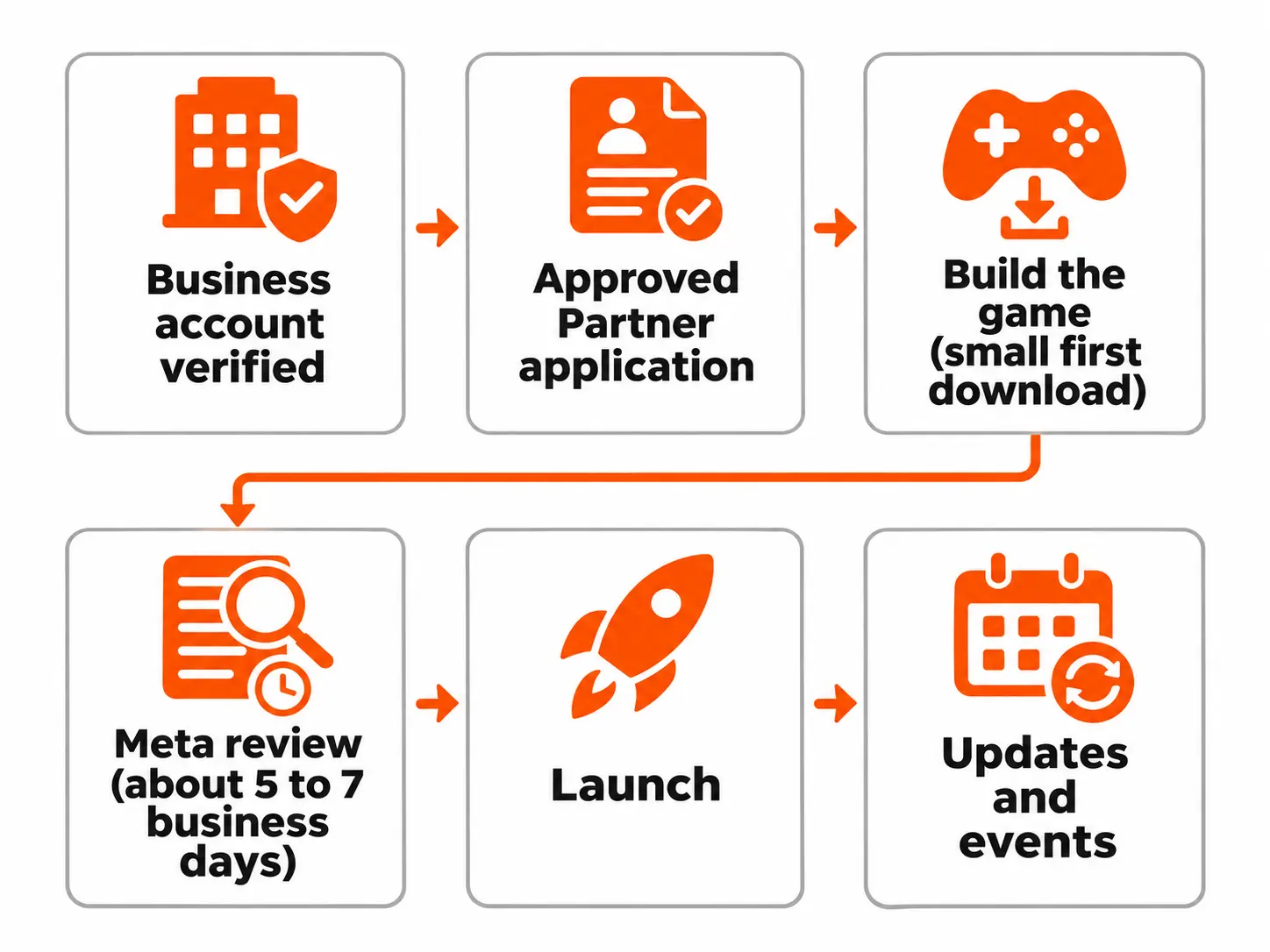
Every Facebook developer games project now starts in the App Dashboard at developers.facebook.com. The path from idea to launch looks like this, based on Meta’s Instant Games documentation:
- Set up a Facebook Business account and get the business verified.
- Apply to Meta’s Approved Partner Program. Meta needs this before any Instant Game can go live.
- Create an app, add the Instant Games product, and choose Zero Permissions as the connection setting.
- Build the game in an HTML5 engine such as Phaser, PixiJS, Cocos Creator, Construct, PlayCanvas, or Unity with a WebGL export, and connect it to Meta’s Instant Games SDK. (More on choosing an engine below.)
- Zip the game with index.html and the fbapp-config.json file at the top level, and upload it.
- Test it inside the real Facebook and Messenger apps on iPhone and Android, using people added as testers on the app, and on a desktop browser. A desktop browser alone won’t show you phone memory limits or notch and home-bar spacing.
- Submit it for Meta’s review, fix anything flagged, and launch.
Publishing is free, and Meta takes 30% of in-app purchases (more on making money below).
Which engine should a Facebook game use?
For most casual 2D games, a light web engine such as Phaser, PixiJS, or Cocos Creator is the easier fit, because it starts small and stays within Meta’s first-load advice. Unity works too and makes sense if you already have a Unity game or need 3D. Its web builds start bigger because they carry the engine with them, so the team has to strip unused parts, compress textures, and load most content after the game starts.
Ask any developer which engine they’d pick for your game and why. A good answer mentions the first-load size and low-end Android phones before it mentions their favorite tools.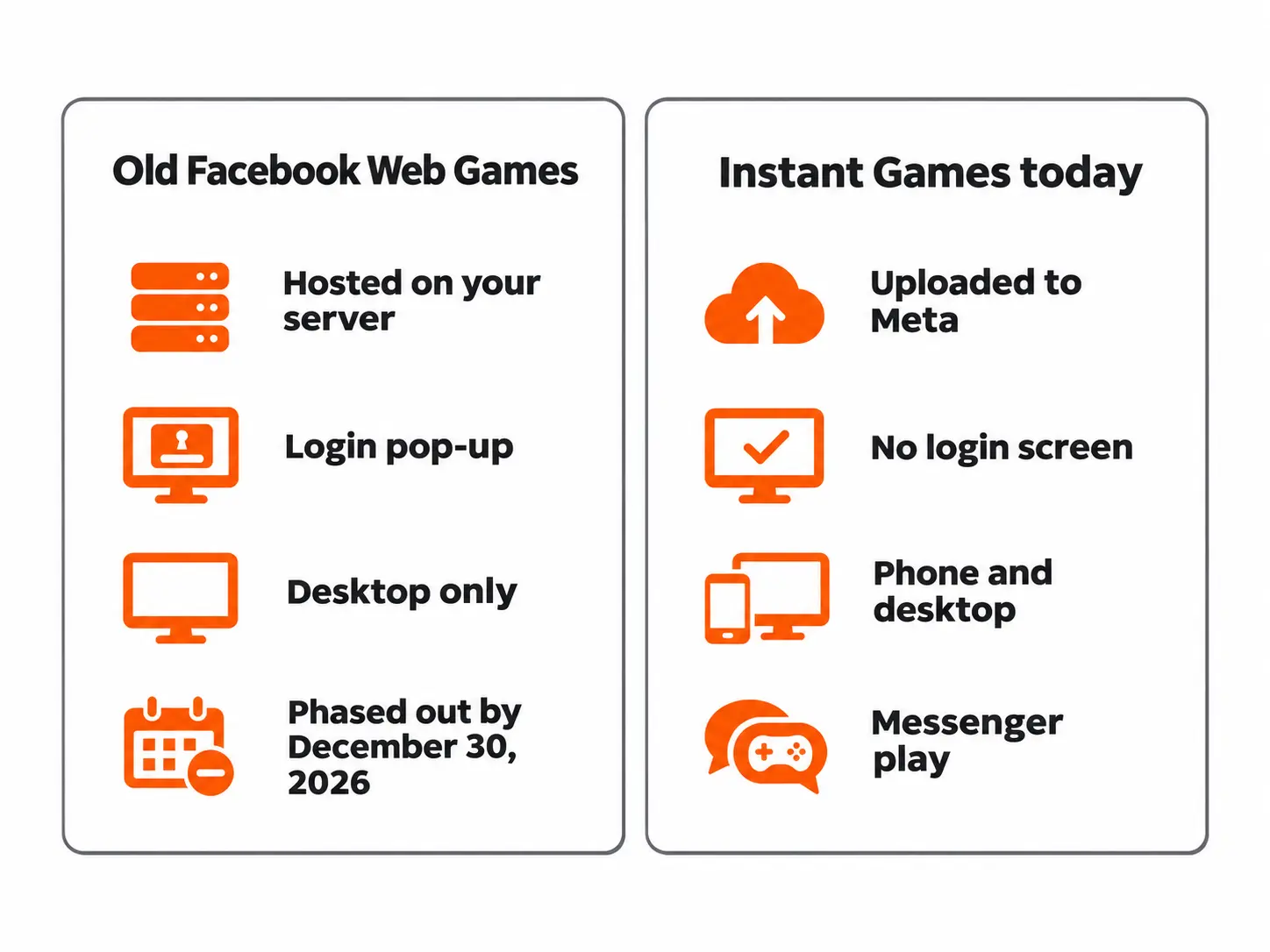
Do you need a Facebook specialist, or will any game developer do?
A good HTML5 game developer can write the game itself. What separates Facebook game developers who have shipped on the platform from everyone else is the work around the code: Meta’s approval, its review rules, its sandbox, and its tight loading budget.
These are the spots where developers new to the platform tend to slip.
| Where it goes wrong | What you’d see | What an experienced developer does |
|---|---|---|
| Loading flow | The game hangs on Meta’s loading screen and never starts | Calls FBInstant.startGameAsync() only when the game is ready, and reports real progress with FBInstant.setLoadingProgress() |
| Player identity | Saved progress gets mixed up, or old player records don’t match | Treats the game’s player ID as its own ID, not the person’s Facebook user ID |
| Names and photos | The developer plans features that read friends’ names in code | Uses Meta’s overlay views to show names and photos |
| Your own server | Calls to the game’s backend fail inside Facebook | Turns on Zero Permissions, uses HTTPS, and gets the server’s domain added to Meta’s allowed list |
| File size | A Unity export that’s too heavy to open quickly on a phone | Splits the game so a small part loads first and the rest loads in the background |
| Meta’s review | Rejection for no tutorial, no pause button, or ads shown too early | Builds the review checklist into the plan from the first sprint |
This is also where money goes. Each rejected review means another round of fixes, another upload, and another wait of several days. Teams that develop Facebook games regularly build these checks in from the first sprint, which cuts down on rejected submissions.
What should you check before you sign with a Facebook game developer?
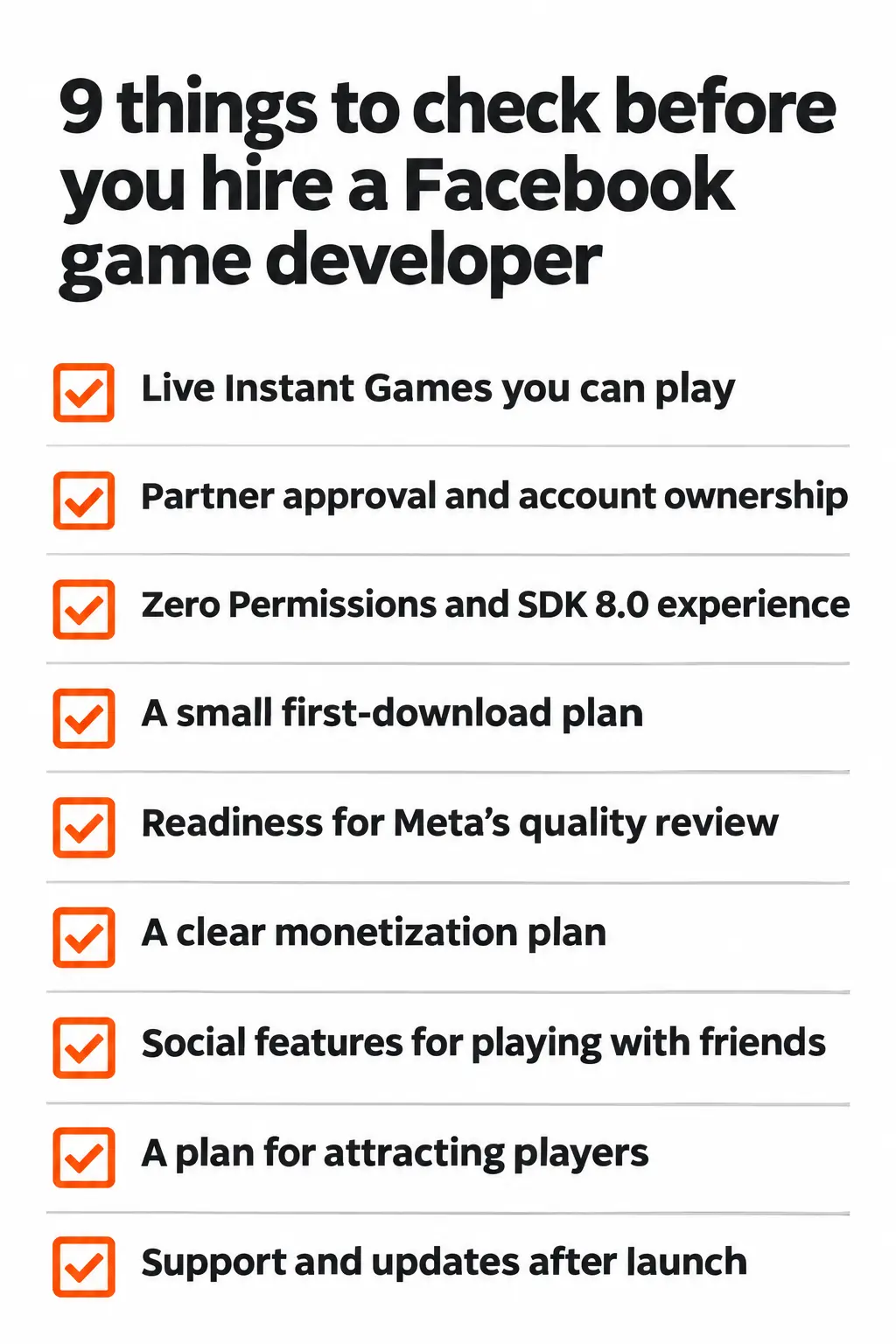
Check nine things: live games you can play, who will hold Meta’s partner approval, experience with Zero Permissions, a plan for a small first load, review readiness, a money plan, social features, a plan for getting players, and support after launch.
Can you play their Instant Games right now?
Plenty of people call themselves an Instant Games Facebook developer. Ask for links to live Instant Games you can open on your own phone. Screenshots and videos won’t show you load times or how the game looks inside a Messenger chat. Play one on a weak mobile connection and count the seconds before you can tap anything.
Also ask what got one of their games rejected in Meta’s review and how they fixed it. Someone who has really shipped on the platform will have a story. Someone who hasn’t will talk in general terms.
Who will hold Meta’s partner approval, and whose account is the game in?
Meta requires the publisher to be accepted into the Approved Partner Program before a game can go live. The application has to be in English and asks for links to games the business has already released on app stores or gaming sites. If Meta turns it down, you have to wait 180 days and show real changes in the business before you can apply again.
That leaves two common setups. Either you apply under your own business, with the developer’s help on the application, or the developer publishes under its approved account. If it’s the second, get in writing how and when the app moves to you. Meta lets an app’s ownership move between developer accounts through the app’s Roles settings, so ask for that step to be part of the handover.
Have they built with Zero Permissions and SDK 8.0?
Every new Instant Game must use Zero Permissions, so a Facebook instant game developer whose last game was built before August 2025 may be working from an older playbook. Ask whether they’ve used Meta’s overlay views for showing player names and photos and how they check player identity on their server (Meta provides signed player info for this).
If your game needs your own server for multiplayer, saved data, or analytics, ask how they’ll get your server’s domain approved inside Meta’s sandbox. Meta’s own migration guide notes this still goes through your Meta partner manager or a support request.
Analytics needs the same planning. Meta’s SDK can log events to the App Dashboard, and outside tools can be added, but Meta warns that tools relying on cookies or local storage may not work fully inside the Facebook app. Ask how they’ll track retention, drop-off points and crashes, and which domains that need approval.
How will they keep the first load small?
Ask what size the first download was on their last Instant Game. Meta allows bundles up to 400 MB, but its FAQ advises keeping the first load under 5 MB and aims for the game to be playable within 3 seconds, adding that the best games load in under 2 seconds.
This matters because players tap a game in their feed or a chat and leave if nothing happens. Meta’s quality guidelines, in effect since May 1, 2026, count a load time over 30 seconds as a critical failure. Low-end Android phones are the hardest case. Meta says the memory available to the whole Facebook app, your game included, can be as low as 512 MB on some of them.
Do they plan for Meta’s quality review?
Meta’s FAQ says most games are reviewed within 5 to 7 business days. The most common reasons for rejection are a missing tutorial, no pause button, no volume control or broken back navigation, ads that interrupt play, slow loading, poor-quality icons and cover art, and games that copy a well-known title too closely.
A few rules catch first-timers off guard. The game must be fully playable in English even if you’re aiming at another market. Placeholder text and debug tools must be gone. The title and icon must match what the game actually is. Ask the developer to show you their pre-submission checklist.
How will the game make money?
Instant Games earn money in two ways: in-app purchases and ads from Meta’s Audience Network. Meta takes 30% of in-app purchases, and its in-app ads documentation describes a revenue share of about 70% to the developer and 30% to Meta, which can vary by agreement and market.
A developer who knows the platform will plan ads around Meta’s rules. That means no ads the moment the game opens, no ads in the middle of a level, interstitial ads no more than once every 30 seconds, and a game that keeps working when an ad fails to load. Rewarded video ads, where a player chooses to watch in return for a bonus, usually earn the most.
Ads also need their own setup. Before any ad shows, someone has to complete Audience Network onboarding in Meta’s Monetization Manager, accept its terms, set up payouts and create an ad placement for each spot in the game.
Meta pays ad revenue monthly, and its ads guide notes that earnings per ad are higher in markets like the US and UK and tend to rise in the fourth quarter. So don’t plan your first months around ad income, and ask the developer who handles this setup.
Will they design the game around playing with friends?
The strongest Facebook games give people a reason to bring a friend in. The Instant Games SDK can tell the game whether someone is playing alone, in a Messenger thread, or in a Facebook Group and the game can change what it shows based on that.
Ask how they would use tournaments, friend leaderboards, and turn updates sent to a chat. Also ask how they’ll limit how often the game sends updates, since too many wear players out.
How will players find the game?
Players find Instant Games through the Gaming tab, News Feed, Messenger chats, notifications, Facebook Search, and game pages, according to Meta’s discovery guide. Meta also says games that get regular updates are favored over stale ones. Paid growth runs through Click-to-Play ads, which let someone tap an ad and start playing straight away and which have their own eligibility rules.
Be realistic here. Meta’s launch guide says new games don’t get large amounts of traffic right after launch.
The same guide says games with strong Day 1, Day 7 and Day 28 retention, and with friends playing, get shown more in recommendations, and the launch guide suggests reworking the tutorial or early gameplay if fewer than 20% of players come back the next day. That’s why the first few minutes of play and the invite flow matter so much.
Ask the developer what they’ll build in for sharing and invites and how players can opt in to notifications from the game.
What happens after launch?
Bug fixes don’t need another quality review, but bigger changes can trigger one. Ask how the developer will handle larger updates, and avoid major changes to gameplay, pricing, or the UI in the first week, when they can confuse new players.
Also ask who covers forced changes. Meta has retired SDK versions and connection setups before (the move to Zero Permissions needed SDK 8.0), and ad earnings vary by country and format. Your support plan should say whether required SDK upgrades and ad setup tuning are included, as well as bug fixes.
Which hiring option fits your Facebook game?
Most small, single-player games can be done by a skilled freelancer. Games with multiplayer, in-app purchases, or a lot of art usually need a team that covers design, art, code, and servers.
| Option | Best for | Meta partner approval | Art, code and backend | Main risk | Your workload |
|---|---|---|---|---|---|
| Freelancer | A simple single-player game with a fixed design | Usually under your business, so you apply | Often code only, so you source art and servers | One person is a single point of failure | High |
| In-house hire | An ongoing slate of Facebook games | Under your business | One hire rarely covers everything | Slow and costly to staff for one game | High |
| Full-cycle studio | A first game you want delivered end to end | Studio can guide or handle it | Design, art, code, backend and testing in one team | Pick one with live Instant Games | Low |
| Dedicated team from a studio | You have a producer and want extra hands | Your business, with studio help | You choose the roles | You still run the project | Medium |
For a wider look at hiring models, costs, and interview questions across all platforms, see our guide on how to hire game developers. If you already have a producer and want people to slot into your team, a dedicated team of game developers may suit you better than handing over the whole project.
How you pay matters as much as who you hire. A fixed price with milestones works when the scope is locked: a single-player game with a finished design or a straightforward port. Paying for time and materials, or a monthly team, suits work that changes as you learn, such as multiplayer, tuning the in-game economy, and ongoing events.
Not sure which option fits your game?
Tell us what you're planning. We'll suggest the right setup and a realistic scope, and we'll tell you if a freelancer would serve you better.
What if you already have a Facebook web game or a mobile game?
If you had a Facebook web game, it now has to become an Instant Game to stay on Facebook, and Meta’s final cutoff for games still being moved is December 30, 2026. If you have a mobile game, you can often bring it to Facebook as an Instant Game, as long as the engine can export to HTML5.
Your game was a Facebook web (Canvas) game
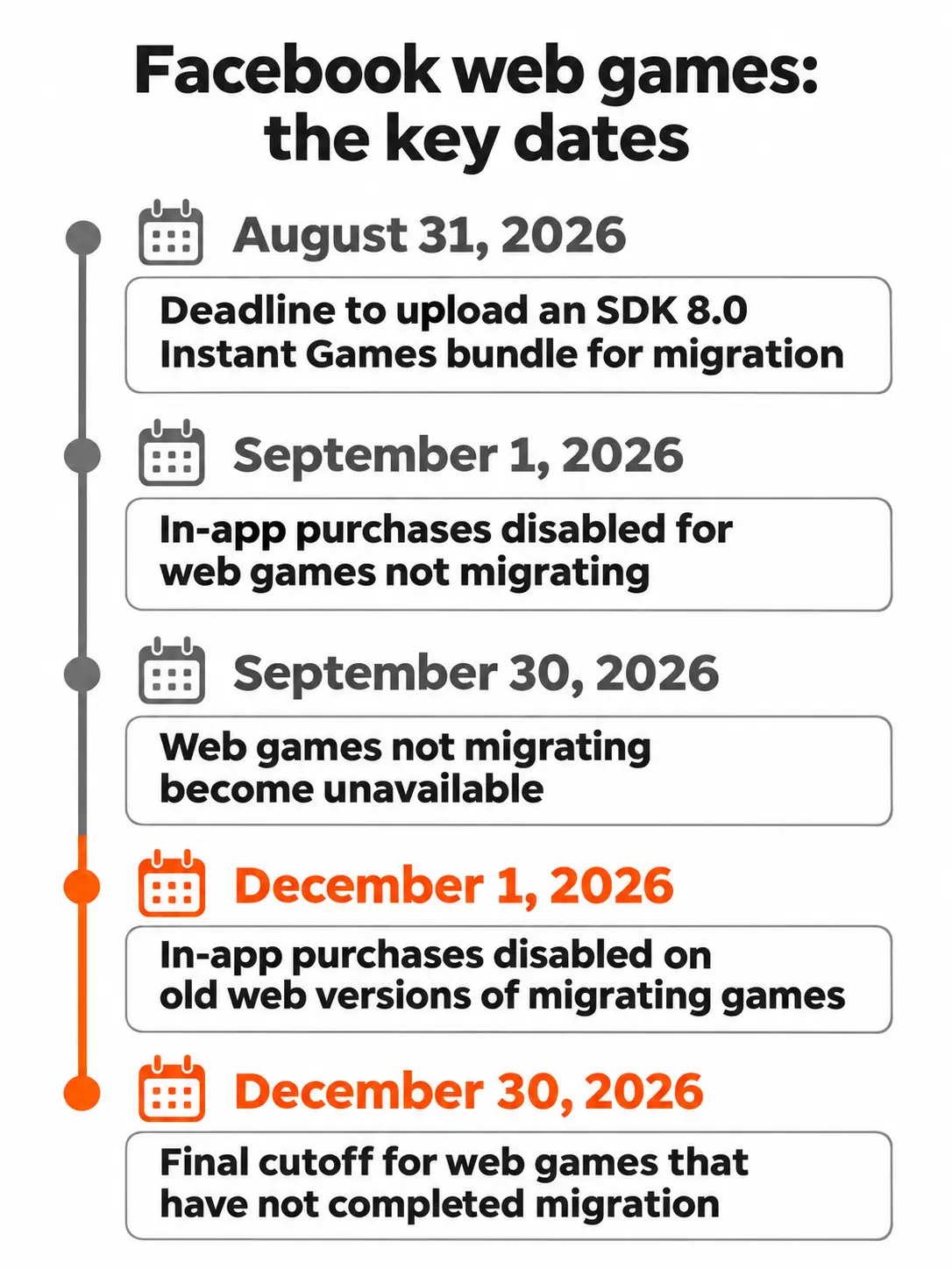
Meta’s Canvas migration guide set these dates:
- August 31, 2026: last day to show Meta the game was being moved by uploading an Instant Games bundle built with SDK 8.0.
- September 1, 2026: in-app purchases turned off for web games that weren’t moving.
- September 30, 2026: web games that weren’t moving stopped being available on Facebook.
- December 1, 2026: in-app purchases turned off on the old web version of games that are moving.
- December 30, 2026: any web game that hasn’t finished moving stops being available on Facebook.
If you’re still finishing a move, a few details trip teams up. The player ID in an Instant Game is not the Facebook user ID your web game used, so old progress has to be matched to players using a separate ID Meta provides for this. Your in-app purchase catalog doesn’t carry over and has to be set up again. And once you send a share of players to the new version, Meta won’t let you lower that share again, so move paying players last, after purchases are proven to work.
If you missed the August deadline, the old version is gone from Facebook, but your code, art, and any player data on your own servers aren’t. A developer can rebuild the game as a new Instant Game. Have them check first what player data you still hold, since that decides whether old progress can come across.
Your game is on mobile
Meta says many Instant Games started out as mobile games. If yours is built in an engine that exports to HTML5, the work is mainly adding Meta’s SDK, cutting the first download down, and adapting the UI. If it’s written natively (Swift, Kotlin, or C++), it needs rebuilding with web tech or an engine that exports to WebGL, such as Unity.
Unity WebGL builds can be large, so the first technical question should be how small the first load can get. Our game porting team handles this kind of move and has gone the other way too: we took the Facebook game Rollo & Lost-Monsters to iOS and Android, reusing its Box2D physics code and Spine animations and redesigning the screens for touch.
How much does Facebook game development cost, and how long does it take?
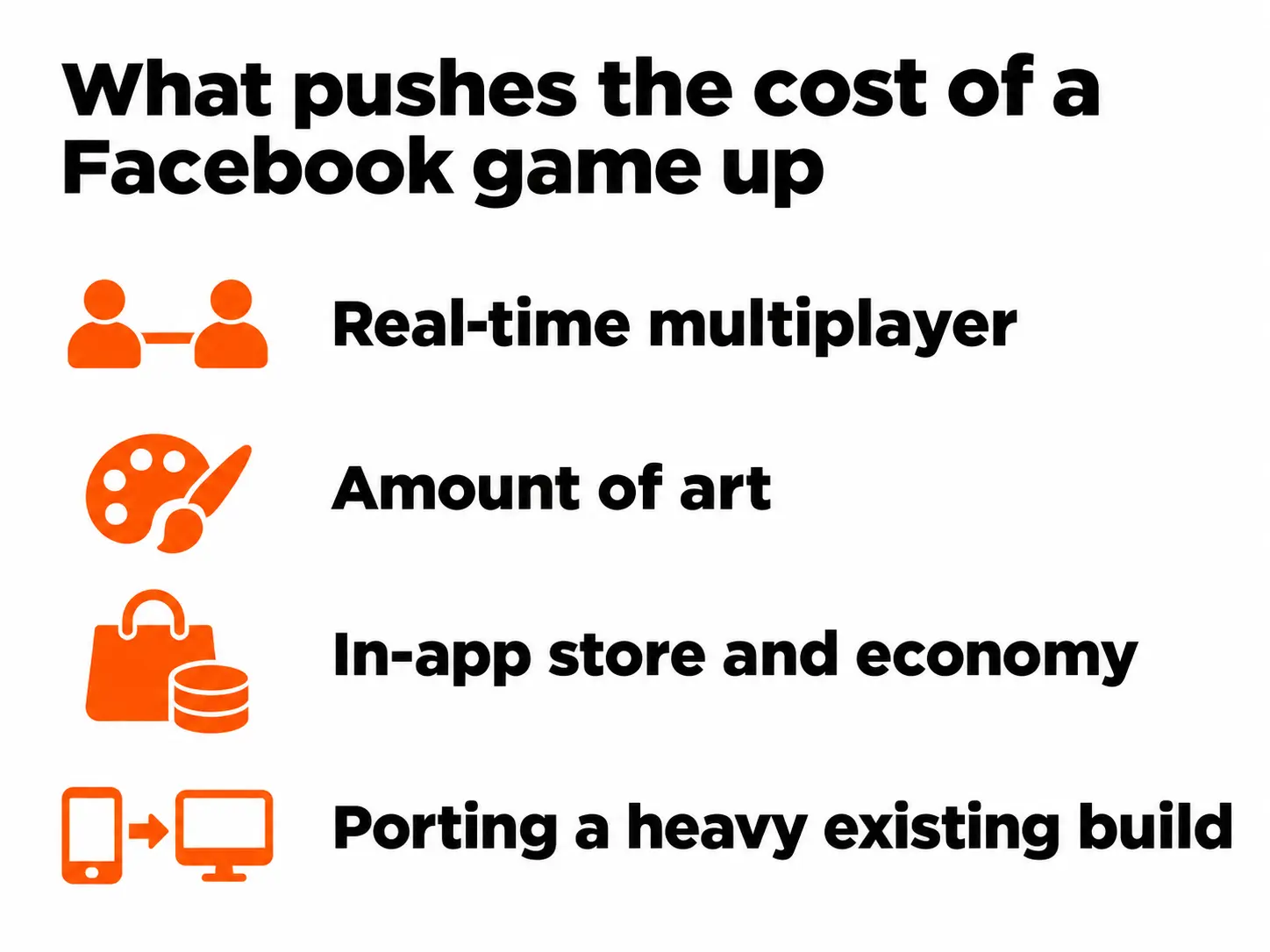
The cost of Facebook game development depends mostly on four things: real-time multiplayer, the amount of art, how the game makes money, and whether you’re starting fresh or reusing an existing game. Publishing itself is free.
| Project type | What’s usually included | Biggest cost driver | Typical timeline | Budget range |
|---|---|---|---|---|
| Simple single-player casual game (puzzle, word, trivia) | Core game, tutorial, leaderboard, ads | Level design and art | [Juego to confirm] | [Juego to confirm] |
| Social casual game with purchases and tournaments | Above plus in-app store, tournaments, events | Economy design and testing | [Juego to confirm] | [Juego to confirm] |
| Turn-based multiplayer card or board game | Matchmaking, invites in Messenger, game server | Backend and fair-play checks | [Juego to confirm] | [Juego to confirm] |
| Bringing an existing mobile or Unity game to Facebook | Engine export, SDK work, load-time cuts, UI changes | How heavy the current build is | [Juego to confirm] | [Juego to confirm] |
| Rebuilding a retired Facebook web game | New bundle, new store setup, player data review | How much code can be reused | [Juego to confirm] | [Juego to confirm] |
Developing Facebook games also involves steps outside the developer’s control. Meta’s partner approval and business verification come first, and the quality review usually takes 5 to 7 business days, longer if fixes are needed.
When you collect quotes, ask each developer to price game design and development as separate lines and to give a timeline for each milestone. That makes quotes easier to compare, and it shows you whether someone has actually thought about your game. If your idea is a classic board game, our breakdown of Ludo game development cost shows how features such as online play and playing with friends change the price.
What should your contract with the developer cover?
Your contract should make sure you own the game and everything Meta ties to it and that payments line up with the game passing Meta’s review. A delivered file isn’t the same as a game that’s live.
- The App ID and Facebook Business account are yours, or the contract sets a date and steps for moving them to you.
- The source code lives in a repository you control, and you get the original art files as well as the exported images.
- At least one milestone payment depends on passing Meta’s quality review, and the contract says who fixes rejections and how many rounds are included.
- Responsibility for Meta’s data rules, including deleting any player data the old setup allowed, is clearly assigned.
- Performance targets the game must meet before final payment, such as a first download under 5 MB and a playable game within about 3 seconds, tested on an agreed low-end Android phone. These match Meta’s own advice.
- A promise that all fonts, music, sound effects, plugins, and code libraries are properly licensed for commercial use.
- A support period after launch, with response times for crashes and failed purchases.
- Clear ownership of the game idea and all work produced. Our guide on protecting your IP when you outsource game development covers this in more depth.
How can Juego Studios help with your Facebook game?
Juego Studios can develop games for Facebook from idea to launch, bring an existing game onto Facebook, or rebuild a game that was on Facebook’s old web platform. We’re a team of 250+ people, with design, art, engineering, backend, and LiveOps in one place, and an office in the US through Juego Studios Inc.
Most projects we take on fall into one of these:
- New Instant Games, from game design and casual game art to game UI/UX design, the HTML5 build, Meta’s SDK, and review prep, through our HTML5 game development services.
- Bringing mobile or Unity games to Facebook and Facebook games to mobile, through game porting.
- Multiplayer and social features backed by a game server. For VOW, a farming game we built for a client in Boston, players on iOS, Android, and Facebook could invite Facebook friends, trade items with them and join weekend tournaments.
- Updates, events, and fixes after launch through our LiveOps support.
[Juego to confirm: whether Juego publishes client games under its own Approved Partner account, helps clients apply under theirs, or both. State it plainly here.]
We’ll also tell you when we’re not the right fit. If you need one small single-player game on a tight budget, a solo freelancer may serve you better, and we’ll say so.
Conclusion
Price alone won’t tell you much. The Facebook game developer worth hiring has launched Instant Games under Meta’s current rules and can show you.
Three things you can do this week, before you request quotes:
- Check that your Facebook Business account exists and is verified, or start the verification. Meta’s partner approval depends on it.
- Play three live Instant Games from any developer on your shortlist, on your own phone, and note how fast they start.
- Write a one-page brief (the game, who it’s for, how it makes money, multiplayer or not) and send the same brief to everyone so the quotes come back in a form you can compare.
If you’d rather hand the whole game to one team, a full-cycle development partner can cover design, art, code, backend, and launch. Send us your brief, and we’ll give you an honest view of scope, timeline and setup.
Frequently Asked Questions
They can be, for the right game. Meta reported 3.64 billion daily users across its apps in September 2026, publishing costs nothing, and players can start a game from a chat without installing anything. Short, social games such as card, board, word, and puzzle games tend to fit best, while large, graphics-heavy games struggle with the small first-load budget.
It depends on scope. A simple single-player game is much quicker than a multiplayer game with its own server. [Juego to confirm typical ranges.] On top of the build, allow time for Meta’s partner approval and about 5 to 7 business days for the quality review.
Yes. Meta requires the publisher to be accepted into its Approved Partner Program before an Instant Game can go live. If an application is rejected, the business has to wait 180 days and show real changes before it can apply again, so it’s worth getting the application right the first time.
Often, yes. If your game is built in an engine that exports to HTML5, such as Unity with WebGL or Cocos Creator, it can be adapted by adding Meta’s SDK, making the first download smaller and adjusting the UI. Games written natively for iPhone or Android need to be rebuilt with web technology.
Through in-app purchases and ads. Meta keeps 30% of in-app purchases, and ad revenue from Meta’s Audience Network is split roughly 70/30 in the developer’s favor, depending on your agreement and market. Most successful games use both.
A clear idea of the game, the platforms and markets you’re aiming for, your budget range, and access to your Facebook Business account if the game will be published under your business. If you have an existing game, share the engine it’s built in and the source files.
Related Posts

How to Hire a Facebook Game Developer in 2027: What to Check Before You Sign
Ask three developers to put your card or puzzle game on Facebook, and you can get three answers that don’t match. One quotes a full iPhone and Android app you never asked for. Another says Facebook games died years ago.
Turning Your Book, Film, or Brand Character Into a Game: What to Prepare and What to Expect
We get that message in many forms. A novel with a loyal readership. A film with a release date already set. A creator whose characters live in short animated videos. A preschool with its own cast of characters. An old film someone wants to bring back as a horror game.
Built Your Game Prototype With AI? Here’s How to Make It Shippable
Imagine your AI-generated game prototype is a small tile puzzle you built with an AI coding tool. Friends open it in their browsers, drag tiles into place, and ask when you’re adding more levels. Then you try the same game on a phone. The page scrolls when you drag a tile, and after you close the app, your progress is gone.