


 Unity
Unity Unreal
 Godot
Godot
 Mobile
 PC
PC Console
 Full-Cycle
 Co-Development
 Outstaffing



-
 Unity Game Development
 Oct 13th, 2026
- Share:
Table of Contents
- TL;DR (Quick Summary)
- How do you know your Unity project needs an audit before more coding?
- What does a Unity code audit actually check?
- What do audits usually find in inherited Unity projects?
- What do you get at the end of a Unity code audit?
- How long does a Unity code audit take, and what does it cost?
- What should the previous team hand over to you?
- What happens after the audit?
- Conclusion
The developer who started your Unity game is gone, and the game isn’t done.
This post explains what a code audit looks at, what it tends to turn up, and how to use it to get quotes you can actually compare.
Dana spent nine months paying an outside team to build her mobile puzzle game. Updates got slower, and then they stopped. When she asked for everything, she got a zip of source code and a shared drive of artwork.
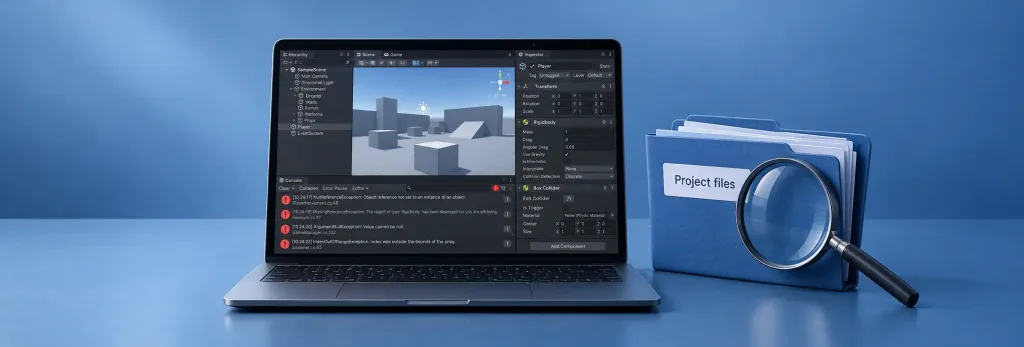
She installed Unity, opened the project, and was asked whether to upgrade it to a newer version. She clicked yes. The Console filled with red errors, and she couldn’t tell if the game was 80% done or 20% done. (If you’re about to do the same, make a copy first. An upgrade rewrites files and is hard to undo.)
Two teams quoted her to finish it. One said six weeks; the other said start over. Neither had opened her files.
Dana isn’t a real client. She’s a composite of messages founders send us from this exact spot, usually some version of “the team I paid didn’t finish, but I have the source code.” If that sounds familiar, this post is about getting a straight answer before you spend any more.
TL;DR (Quick Summary)
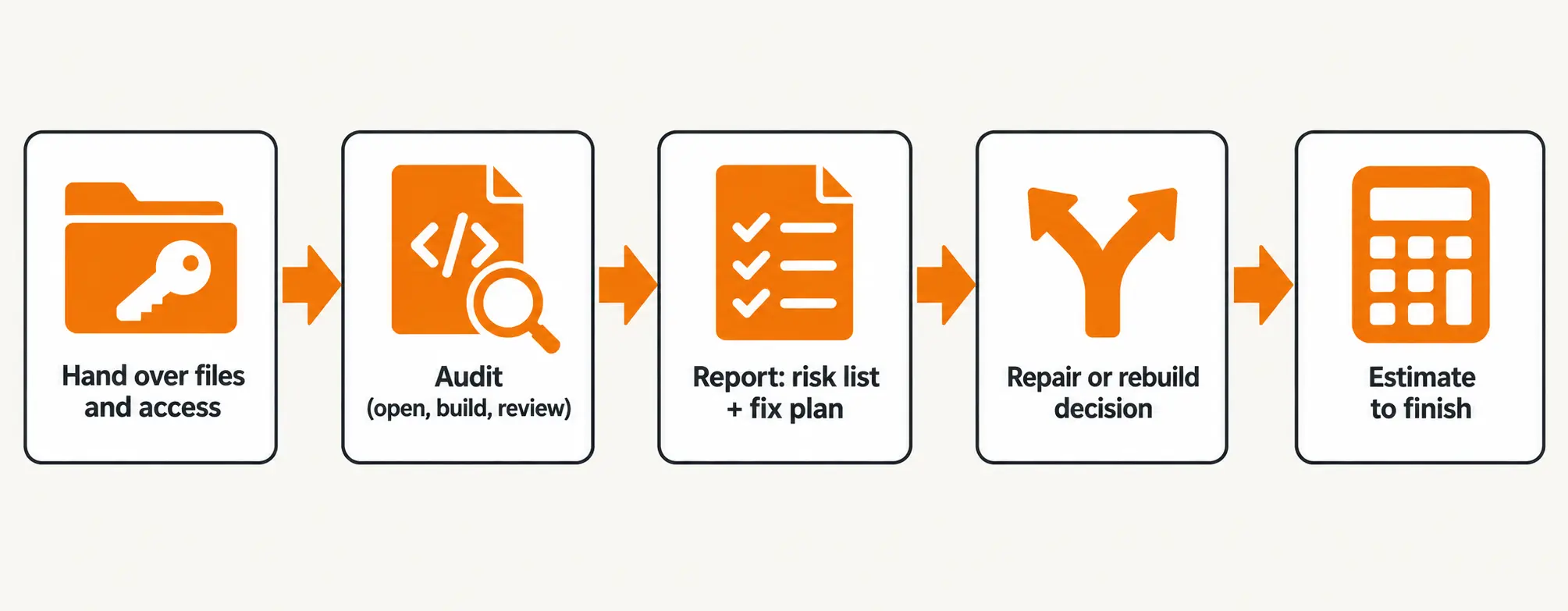
Short answer: A Unity project code audit is a fixed-scope review of an unfinished or inherited project. A senior engineer opens it in the right Unity version, tries to build it for your target platforms, and goes through its structure, packages and plugins, scripts, scenes, and build settings. You come away with a ranked list of problems, a fix plan, and a recommendation on whether to repair the project or rebuild parts of it. That gives any team a real basis for estimating the remaining work instead of a guess. You usually don’t need the original developer, but you do need the complete project files and access to your own accounts.
Key Takeaways
- Get a working build confirmed before you pay for new features.
- A zip file with no version history makes an audit more important, not less.
- Inherited projects can have missing files, broken builds, and accounts still held by the old team.
- A project that won’t build today isn’t automatically a rebuild.
- The code, store accounts, and signing keys should be in your name. Chase those first.
How do you know your Unity project needs an audit before more coding?
If nobody can produce a working build from the files you have, get an audit before anyone writes new code. Features added to a project nobody understands tend to break things that already worked.
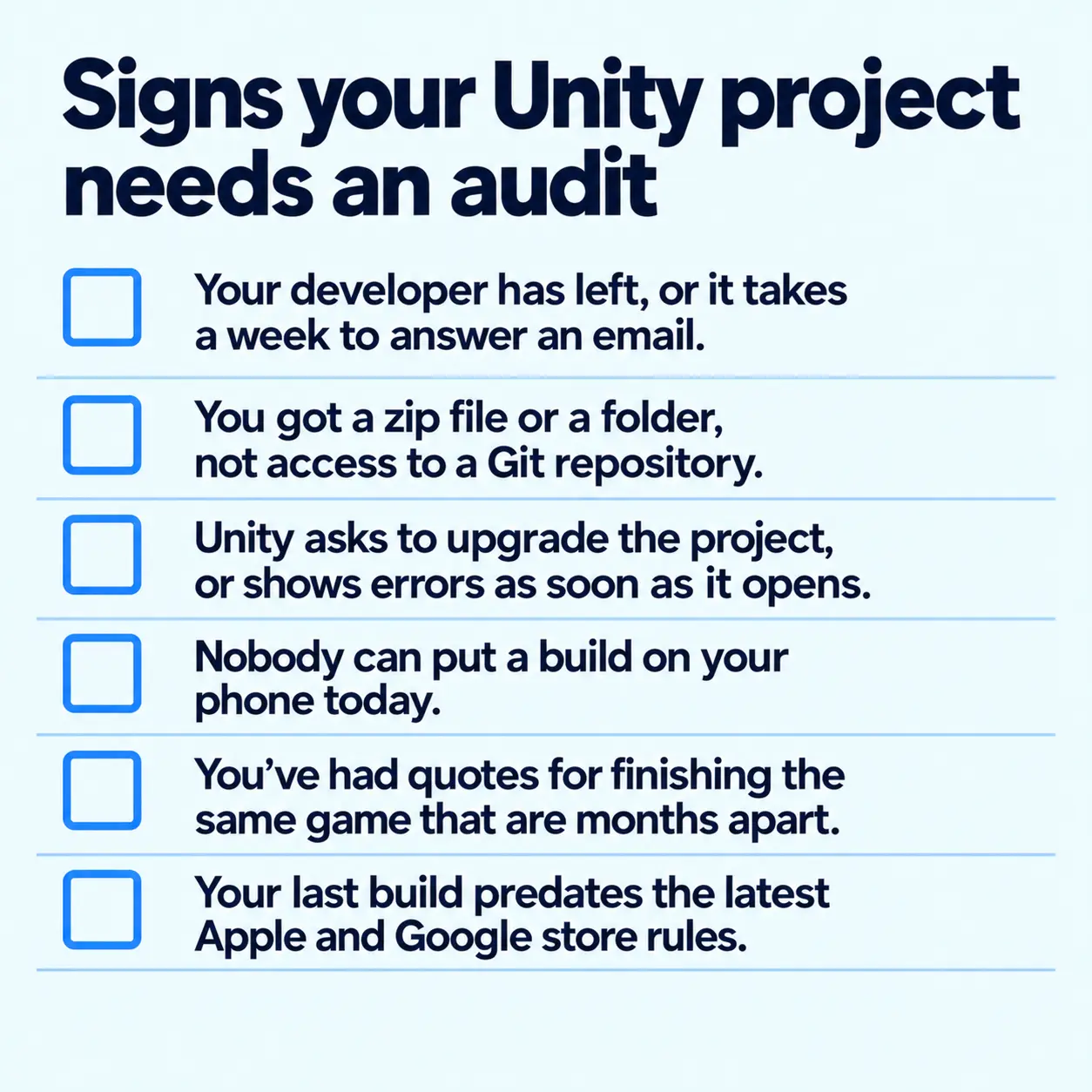
You’re probably in this situation if a few of these sound familiar:
- Your developer has left, or it takes a week to answer an email.
- You got a zip file or a folder, not access to a Git repository.
- Unity asks to upgrade the project, or shows errors as soon as it opens.
- Nobody can put a build on your phone today.
- You’ve had quotes for finishing the same game that are months apart.
- The last build was made before this year’s Apple and Google changes (more on those below).
If two or more of these apply, an audit costs less than finding out halfway through the next contract.
What does a Unity code audit actually check?
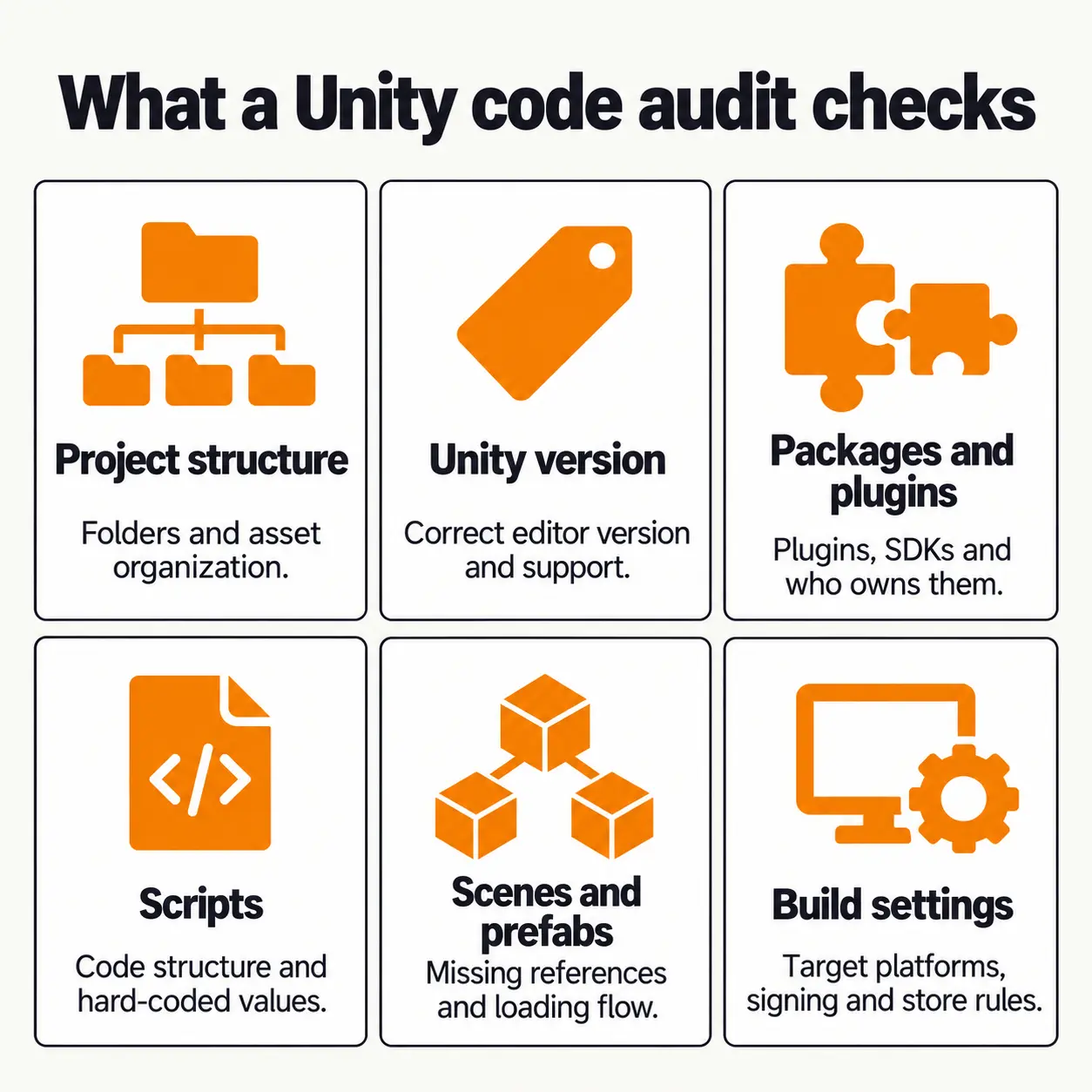
An audit tells you whether a new team can open your project, build it, and change it without breaking things. It’s part codebase review and part build test, and it covers six areas.
| Area | What gets checked | Common red flag |
|---|---|---|
| Project structure | Folder layout, naming, what’s in the Assets folder, unused files | Scripts and art mixed in one folder, several copies of the same asset |
| Unity version | The version saved in the project and how far it is from a supported release | A version that no longer gets fixes, or a project someone half-upgraded |
| Packages and plugins | Unity packages, Asset Store plugins, ad, analytics and payment SDKs | Plugins bought on someone else’s account, SDKs years out of date |
| Scripts | C# structure, error handling, hard-coded values | One script thousands of lines long, API keys typed straight into the code |
| Scenes and prefabs | Missing references, links between objects, loading flow | Pink materials, “Missing Script” warnings, a scene that only works if you start from another one |
| Build settings | Target platforms, signing, player settings, store requirements | No build made for the target device in months, signing set up on the old developer’s laptop |
The first step is the dullest one: opening the project in the exact Unity version it was last saved in, which is written in ProjectSettings/ProjectVersion.txt. Opening it in a newer version first, as Dana did, starts an upgrade that can hide the very problems you’re looking for.
Version support matters too. Unity’s release page lists Unity 6.3 LTS as supported until December 2027, while support for Unity 6.0 LTS ends in October 2026. On anything older than 6.3, the audit should say whether to upgrade now or later, since an upgrade is a small project of its own.
A messy folder structure isn’t fatal, but it slows every later task (here’s what a well-organized Unity project looks like). The engineer will also note the render pipeline, since changing it late means reworking materials and lighting. See how URP, HDRP and the Built-in pipeline compare.
What do audits usually find in inherited Unity projects?
Four problems are worth checking for first: missing files, builds that no longer meet store rules, no change history, and accounts registered to someone else. Found early, they go into the estimate instead of turning up halfway through the work.
Missing files and broken references
Unity tracks how assets connect through small .meta files that sit next to every asset. They’re easy to lose when someone copies only part of the Assets folder, or a repository is set up to ignore them. Then references break, and you’ll see “Missing Script” warnings on objects, and materials that show up bright pink, which usually points to a shader or render pipeline problem.
Paid plugins bought on the previous developer’s Asset Store account are tied to that account. Unity only transfers them in limited cases through its support team, so you may need to buy them again under yours.
Builds that no longer pass store rules
A game that built fine last year might be blocked from the stores today because Apple and Google raise their minimum requirements every year.
- Google Play: Since August 31, 2026, every new app and every update must target Android 16 (API level 36). Games already on the store that target Android 14 or lower are also hidden from new players whose phones run a newer Android version.
- Apple: Since April 28, 2026, every upload to App Store Connect must be built with the iOS 26 SDK or later, which comes with Xcode 26.
Neither rule switches off a game players already have installed. What they block is your next update, and on Google Play, new installs on newer phones. An old Unity version or outdated ad and payment plugins are common reasons a project can’t meet them.
No version control
A lot of small teams never set up Git or Unity Version Control, or the developer set it up in their own account and kept it when they left. Without that history, nobody can see what changed or roll back a change that broke something. Our guide to Git in game development explains why it matters.
Accounts and services you don’t control
Founders are often caught off guard by this one. The game’s backend, its ad network account, or its analytics project may be registered to the previous team. The audit should list every outside service the game talks to and whose name it’s in.
What do you get at the end of a Unity code audit?
You should get a ranked list of problems, a plan for fixing them, and a recommendation on whether to repair or rebuild. In short, the report should tell you what to do next.
A risk list
Each problem, where it sits in the project, how badly it blocks launch, and what happens if you leave it. The list should also say whether the game builds for each platform you care about and who owns each plugin and outside account.
A fix plan
The order to work in, with a rough size for each item. It usually starts with a clean, repeatable build, then whatever the stores require, then bugs, and then the features that were never finished.
A repair-or-rebuild call
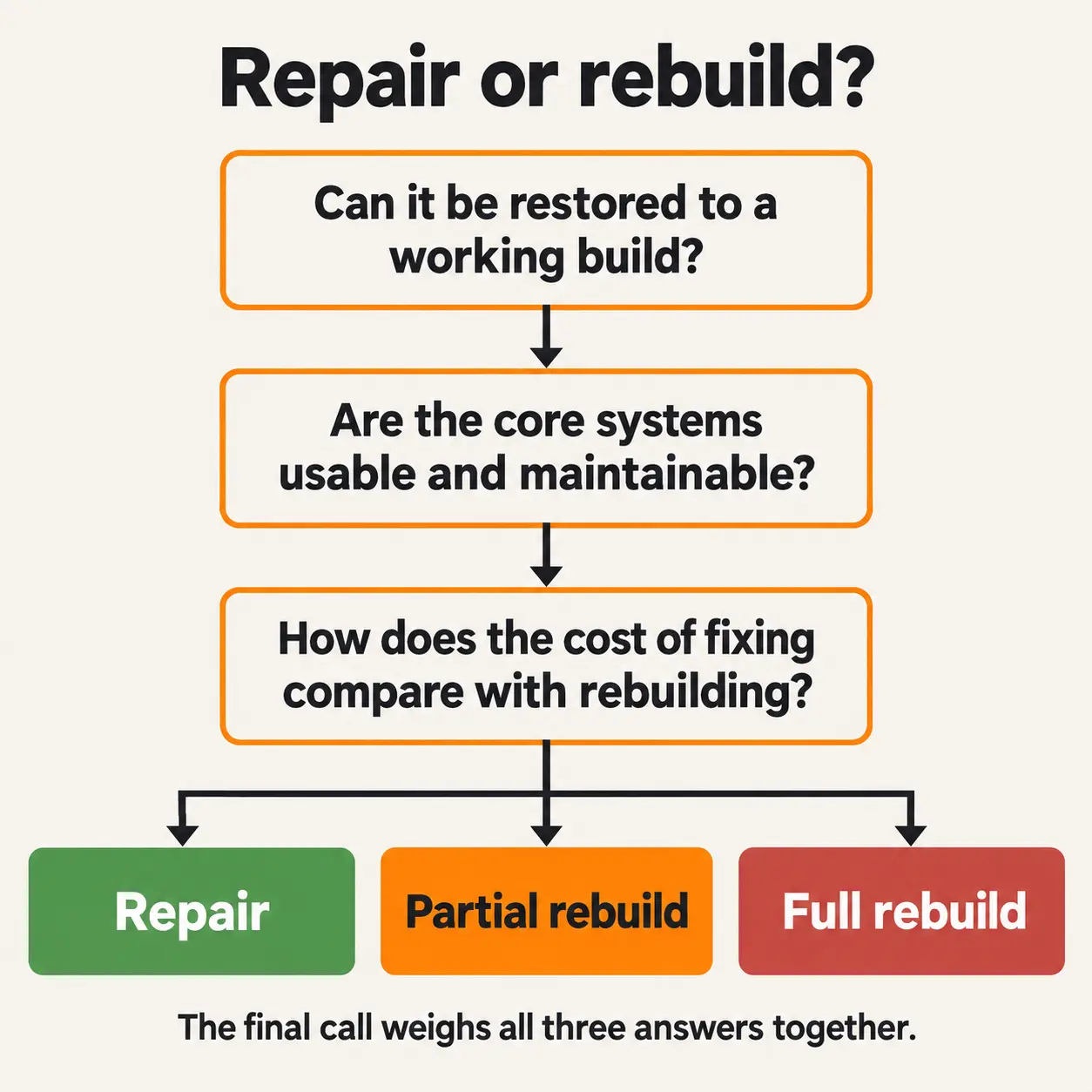
This is the part that decides most of your budget.
| Option | When it fits | What you keep | Main risk |
|---|---|---|---|
| Repair | A working build can be restored, and the core systems are sound enough to build on | Almost everything | Hidden bugs turning up during testing |
| Partial rebuild | A build can be restored, but one or more core systems are too fragile to extend | Art, scenes, and the systems that work | Making old and new code fit together cleanly |
| Full rebuild | Getting to a stable build would cost about as much as rebuilding, or the core systems can’t be reused | Art, design work, and what you learned | A longer timeline and more cost up front |
Don’t read too much into a broken build on its own. A project that won’t build today might be one missing package or a version mismatch away from working. The call should weigh everything together, especially what fixing the core systems would cost compared with rebuilding them.
An audit also has limits. It isn’t a full QA pass or a security audit; it won’t tell you whether the game is fun, and it doesn’t promise the game is ready to launch.
Not sure what you've got? Send us the project and we'll tell you what we find, including if finishing it doesn't make sense.
How long does a Unity code audit take, and what does it cost?
It depends mostly on how big the project is and whether it builds at all. Most audits are priced on senior engineering days, often as a fixed fee agreed before work starts. The ranges below are based on prices game studios and code audit firms published in 2026.
| Audit type | Best for | What’s covered | Typical time | Typical cost |
|---|---|---|---|---|
| Quick health check | Small game, one platform | Opens, builds, top risks | 1–3 working days | $1,000–$4,000 |
| Standard audit | Most mobile and PC games | All six areas, risk list, fix plan | 1–2 weeks | $4,000–$12,000 |
| Deep audit plus estimate | Multiplayer, backend, several platforms | All six areas, backend review, finish estimate | 2–4 weeks | $10,000–$30,000+ |
Treat these as market benchmarks, not quotes. Be wary of 150–500 “code reviews” on freelance marketplaces: they’re usually a one- or two-hour skim for obvious red flags, not an audit. Some studios also credit the audit fee against the fix work if you hire them for it, so it’s worth asking.
Expect it to take longer if the project won’t build on day one, ships on several platforms, has multiplayer or its own backend, or arrives with no documentation and no history.
Once you know what needs doing, our breakdown of Unity game development cost and our guide to how long it takes to develop a video game will help you sanity-check the quotes for finishing it.
What should the previous team hand over to you?
Before a new team can take over a Unity project, you need everything it takes to build, sign, and publish the game without the old team. Ask for these in writing:
- The full project: repository access with its history, or a complete copy that includes the Assets, Packages, and ProjectSettings folders. The Library folder isn’t needed, because Unity rebuilds it.
- The Unity version the project was last opened in.
- Your Apple Developer and Google Play Console accounts, registered in your name or your company’s.
- Signing keys and their passwords, meaning the Android keystore and the Apple certificates. Losing the Android key can make updating your existing store listing much harder.
- Logins for every outside service the game uses, such as the backend, Unity services, analytics, ads, and payments.
- A list of paid plugins and whose account bought each one.
- Original art files, design documents, and any notes on how the systems work.
If your contract never said who owns the code and the accounts, sort that out before the next team starts. Our guide to protecting your IP in outsourced game development covers what to get in writing.
What happens after the audit?
With the report in hand, every team can quote against the same facts. The next step is a fix-and-finish estimate built on what the audit found.
At Juego, the audit report is where that estimate starts. If you want one team to carry the project from audit to launch, our Unity game development company page shows how our engineering, art, and QA teams work on Unity projects together. If the report says you’d be better off starting again, or you only need a little help, we’ll say so.
Whoever you go with, ask how they’ll test the game, because inherited code tends to hide bugs (this overview of types of game testing helps). Our list of common mistakes when choosing Unity developers can help the next handover go better than the last, and our practical guide to Unity game development covers the bigger picture.
Conclusion
Dana’s first move was to ask for quotes, which is what most people do. Both quotes were guesses, though, because nobody had opened her project.
An audit would have told her whether the game builds, what’s broken, which accounts she doesn’t control yet, and whether repairing beats rebuilding. Her next quotes could then be compared properly.
If you’re sitting on an unfinished Unity project, send it over. We’ll tell you where it stands and what it would take to finish.
Frequently Asked Questions
A quick health check of a small, single-platform game usually takes 1–3 working days. A standard audit of most mobile or PC games takes about 1–2 weeks. A deep audit of a multiplayer, backend-heavy or multi-platform project can take 2–4 weeks. Projects that won’t build on day one end up at the longer end of each range.
Yes, in most cases, as long as the new team has the complete source files, the right to work on them, and access to the accounts the game depends on. The audit shows whether finishing means repairing the existing code or rebuilding parts of it.
It helps, but it isn’t required. A short handover call can save a lot of time on custom systems. Without one, a senior engineer can work out how the project fits together from the files.
Then it’s a new build that reuses your art rather than a takeover. A short review can still check whether the art is ready for Unity and what’s missing.
It depends. If the store you’re shipping to won’t accept builds from your current setup, upgrading isn’t optional. Otherwise the audit weighs how old the version is against how much an upgrade could break, and sometimes it’s safer to finish on the current version and upgrade after launch.
It should be if you set it up properly. Sign an NDA, agree to the audit scope in writing, and share it through a repository you control with read-only access for the auditors. Remove that access when the audit ends, and make sure the agreement says you own the code and the report.
Related Posts
Inherited a Half-Built Unity Game? What a Code Audit Checks and What It Costs
This post explains what a code audit looks at, what it tends to turn up, and how to use it to get quotes you can actually compare.

5 Unity Studios in India: 2026 Comparison Guide
Unity has quietly become the backbone of modern mobile and cross-platform game production. From live-service mobile titles to scalable PC builds, it’s no longer just about using Unity. It’s about whether a studio can ship, scale, and sustain production without cracks showing later.

URP vs HDRP vs Built-in: Choosing the Right Unity Render Pipeline for Your Game
If you’re scoping a new Unity project this year, “which render pipeline” has become a decision with a shelf life, not a technical checkbox you tick and move past. Unity’s 2026 strategy shift narrowed the field: Built-in is being phased out, HDRP is in maintenance mode gaining only platform reach, and URP is where nearly all of Unity’s engineering investment is going.