


 Unity
Unity Unreal
 Godot
Godot
 Mobile
 PC
PC Console
 Full-Cycle
 Co-Development
 Outstaffing



-
 Unity Game Development
 Aug 12th, 2026
- Share:
Table of Contents
- TL;DR
- What's actually different between URP, HDRP, and Built-in?
- Is Built-in still a safe choice for a new Unity project in 2026?
- Which pipeline fits your target platform?
- URP vs HDRP: what's the real performance tradeoff?
- URP vs HDRP vs Built-in: side-by-side comparison
- How do you choose for your specific project?
- What this means for your budget, timeline, and dev partner
- Conclusion: URP or HDRP is no longer a three-way decision
If you’re scoping a new Unity project this year, “which render pipeline” has become a decision with a shelf life, not a technical checkbox you tick and move past. Unity’s 2026 strategy shift narrowed the field: Built-in is being phased out, HDRP is in maintenance mode gaining only platform reach, and URP is where nearly all of Unity’s engineering investment is going.
For a technical director or producer weighing mobile reach against PC or console fidelity on a budget and timeline that won’t allow for a mid-project re-platform, that policy shift changes the calculus as much as any performance benchmark does. Here’s how the three pipelines actually differ and how to match one to your platform, visual target, and team.
TL;DR
- Unity began formally deprecating the Built-in Render Pipeline in Unity 6.5 (2026), and it’s guaranteed support only through Unity 6.7 LTS, with official coverage ending no earlier than 2028 (2029 on Enterprise or Industry licenses). Starting a new project on Built-in in 2026 is a decision you’ll have to unwind later.
- URP is the pipeline Unity is investing in going forward and has been the pipeline behind the vast majority of Unity games shipped in the past three years, covering mobile, PC, console, and XR from one codebase.
- HDRP is the only Unity pipeline built for real-time ray tracing, volumetric lighting, and full photoreal fidelity, but it requires DirectX 12 and compute-shader-capable GPUs, which rules out most mobile hardware and older consoles.
- Platform economics back this split: in Newzoo’s 2025 Global Games Market Report, PC revenue grew 12% year over year, the fastest of any platform, while mobile still anchors the largest overall player base, meaning the “which platform” question shapes the pipeline choice as much as the “how pretty” question does.
- For cross-platform and mobile-first titles, URP is the practical default. For single-platform, PC or console-first titles chasing photoreal fidelity, HDRP is worth the extra technical overhead if you have the GPU budget and the technical art team to run it.
- The right call comes down to four things: target platform, visual bar, your team’s technical-art depth, and how long the project needs to live before a pipeline migration becomes unavoidable.
If you’re scoping a new Unity project this year, “which render pipeline” has become a decision with a shelf life, not a technical checkbox you tick and move past. Unity’s 2026 strategy shift narrowed the field: Built-in is being phased out, HDRP is in maintenance mode gaining only platform reach, and URP is where nearly all of Unity’s engineering investment is going.
For a technical director or producer weighing mobile reach against PC or console fidelity on a budget and timeline that won’t allow for a mid-project re-platform, that policy shift changes the calculus as much as any performance benchmark does. Here’s how the three pipelines actually differ and how to match one to your platform, visual target, and team.
What's actually different between URP, HDRP, and Built-in?
Built-in is Unity’s original, fixed-function-era pipeline; URP is a lightweight, scriptable pipeline tuned for performance across every platform Unity supports; HDRP is a heavyweight, scriptable pipeline tuned for maximum visual fidelity on PC and current-gen consoles only.
All three render pipelines use the same Unity editor and the same core engine, but they compile different shader variants, expose different lighting models, and carry very different GPU cost profiles. Built-in dates back to Unity’s early fixed-function rendering days: it’s simple, well documented from a decade of tutorials, and it runs almost anywhere, but it lacks the physically based, scriptable lighting features developers now expect by default, and Unity has confirmed it will not receive further feature investment. URP replaced it as the general-purpose default; it uses the Scriptable Render Pipeline (SRP) architecture, exposes the
SRP Batcher and GPU Resident Drawer for CPU-side draw-call reduction (see Unity’s GPU instancing documentation), and scales from 2D mobile titles to XR to last-gen console. HDRP uses the same SRP architecture as URP but is built exclusively around high-end rendering features: deferred and forward hybrid rendering, real-time ray tracing on DirectX 12, volumetric lighting and clouds, and physically based camera and material systems, all at a GPU and build-complexity cost that Built-in and URP don’t carry.
Is Built-in still a safe choice for a new Unity project in 2026?
No. Unity officially marked the Built-in Render Pipeline as deprecated starting in Unity 6.5 and strongly discourages using it for anything new.
This is the part of the decision that’s changed most recently, and it’s worth being precise about the timeline because a lot of the pipeline comparisons written before mid-2026 don’t reflect it. Unity’s stated position: Built-in will still ship in Unity 6.7 LTS to support studios with existing live games, and official support continues until at least the end of 2028 (2029 for Unity Enterprise or Industry license holders), but no new features are planned, a final removal version hasn’t been set, and Unity is actively converting its own education content and Asset Store defaults to URP-first. If you’re starting a new build today, choosing Built-in means budgeting for a pipeline migration sometime before your game’s support window closes. If you’re maintaining a live game already on Built-in,the practical move is to treat this as a planned porting and modernization pass now, while Unity’s own migration documentation and tooling are still actively maintained, rather than waiting until support formally ends
Which pipeline fits your target platform?
URP covers mobile, PC, console, and XR from a single codebase; HDRP is scoped to PC and current-gen or next-gen consoles with compute-shader GPUs.
Mobile
URP is effectively the only realistic choice. HDRP requires compute shaders and, for its ray tracing features, DirectX 12, neither of which the majority of mobile GPUs support, and HDRP doesn’t support OpenGL ES devices at all. URP’s SRP Batcher and GPU Resident Drawer exist specifically to cut CPU-side draw-call overhead, which is the bottleneck that actually caps frame rate on phones, since mobile GPUs tend to be bandwidth-bound rather than compute-bound. Given that mobile still anchors the largest share of the global games audience, defaulting to URP for anything with a mobile SKU isn’t a compromise, it’s the pipeline built for that hardware profile. That pipeline decision doesn’t happen in isolation, it’s shaped by how mobile Unity production is actually structured, from team composition to LiveOps cadence.
PC
PC Both URP and HDRP run on PC, and the choice comes down to visual ambition rather than platform capability. A stylized, competitive, or live-service PC title, one built around readable silhouettes, high and stable frame rates, and broad hardware compatibility, is usually better served by URP, especially if it also needs to reach Steam Deck-class or lower-spec hardware. A single-player, narrative, or visually driven PC title where photoreal lighting and ray tracing are part of the pitch is HDRP’s home turf, provided you’re comfortable setting a higher minimum spec. That’s not a bet against a shrinking platform, either: PC revenue grew 12% year over year in 2025, the fastest growth of any platform, per Newzoo’s Global Games Market Report. Fidelity alone doesn’t win PC and console players over, though; it’s worth weighing HDRP’s visual ceiling against what PC and console gamers actually expect from production quality before treating it as the whole pitch.
Console
Current-gen consoles (PS5, Xbox Series X/S) support both pipelines. Nintendo Switch 2 is a newer case: Unity confirmed URP support at launch and is actively bringing official HDRP support to Nintendo Switch 2 developers starting in Unity 6.5, which is new as of this year and worth knowing if you were told HDRP wasn’t viable on Switch 2 even a few months ago. Last-gen or handheld-constrained console targets should default to URP for the same GPU-bandwidth reasons as mobile. Pipeline choice is only one part of shipping on console, though: architecture constraints and platform compliance requirements shape the build long before rendering settings enter the picture. If you’re outsourcing any part of a console build, it’s also worth knowing why most outsourced console titles fail certification, since the reasons rarely have anything to do with the render pipeline.
URP vs HDRP: what's the real performance tradeoff?
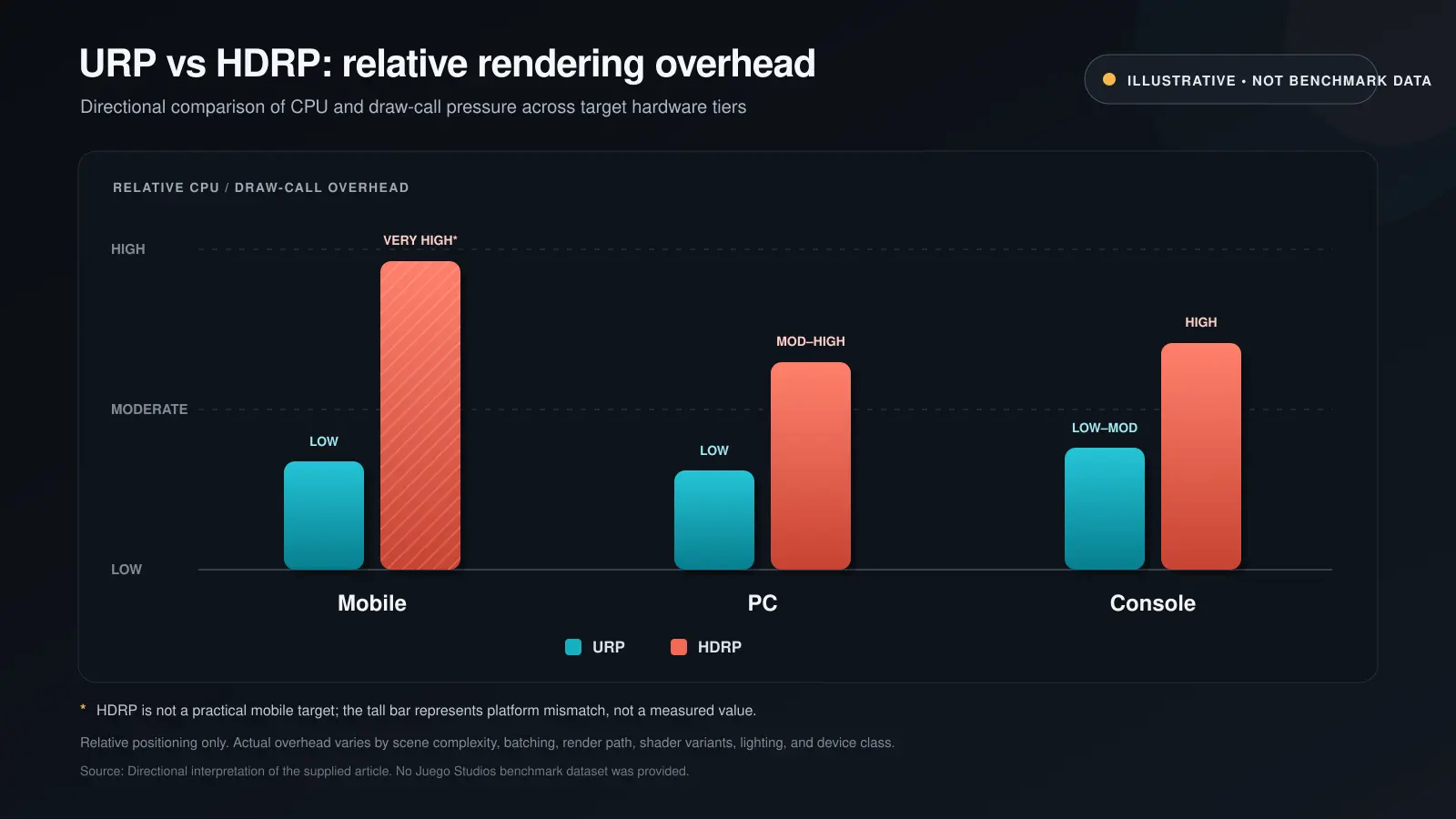
URP is optimized to minimize CPU and GPU cost per draw call at the expense of built-in visual features; HDRP spends GPU budget on lighting fidelity by default and expects you to have the headroom for it.
The practical difference shows up in three places. First, draw-call handling: URP’s SRP Batcher reduces the per-draw-call GPU setup cost and keeps material data resident in GPU memory, and in Unity 6, the GPU Resident Drawer takes this further by moving more of that batching work off the CPU entirely, which matters most on mobile and lower-end hardware where CPU-side driver overhead is usually the actual bottleneck, not raw GPU compute. Second, lighting cost: HDRP’s physically based lighting, volumetrics, and ray tracing are powerful but expensive by default; they assume a GPU with room to spare, whereas URP’s lighting model is intentionally leaner so it degrades gracefully on weaker hardware. Third, build and iteration cost: HDRP projects generally compile more shader variants and carry a heavier baseline build size, which extends iteration time for a small team, worth weighing before assuming photoreal fidelity is free once you have the license.
None of this means URP can’t look good, recent URP investment specifically targets closing the visual gap with dynamic global illumination, screen-space reflections, and on-tile post-processing for mobile, or that HDRP can’t run acceptably outside AAA. It means the two pipelines are tuned for different cost curves, and picking the wrong one for your hardware target shows up as either wasted GPU headroom (HDRP on a title that’s really PC-only in theory but needs to reach modest hardware) or missed frame budgets (HDRP forced onto a phone).
URP vs HDRP vs Built-in: side-by-side comparison
Use this as a quick reference once you already know your platform matrix; the sections above explain the reasoning behind each row.
| Factor | Built-in RP | URP | HDRP |
|---|---|---|---|
| Platform reach | Legacy; all platforms but no longer recommended for new work | Mobile, PC, console, and XR from one codebase | PC and current/next-gen console only |
| Visual fidelity ceiling | Fixed-function era; dated by default | Strong stylized-to-mid fidelity; gap to HDRP is closing | Highest, with real-time ray tracing, volumetrics, and full PBR |
| GPU / CPU cost | Moderate, unoptimized by modern standards | Lean; SRP Batcher and GPU Resident Drawer cut draw-call overhead | Heavy by default; assumes GPU headroom and DirectX 12 for ray tracing |
| Team / technical bar | Low, thanks to a decade of tutorials and Asset Store content | Low to medium | High; needs dedicated technical art to tune properly |
| 2026 support status | Deprecated starting Unity 6.5; supported at least through 2028 (2029 on Enterprise/Industry) | Unity’s primary investment focus going forward | Maintenance mode; feature-frozen except Nintendo Switch 2 support |
| Best fit | Existing live games only, not new projects | Cross-platform, mobile, live-service, most indie-to-mid titles | Single-platform PC/console titles chasing photoreal fidelity |
How do you choose for your specific project?
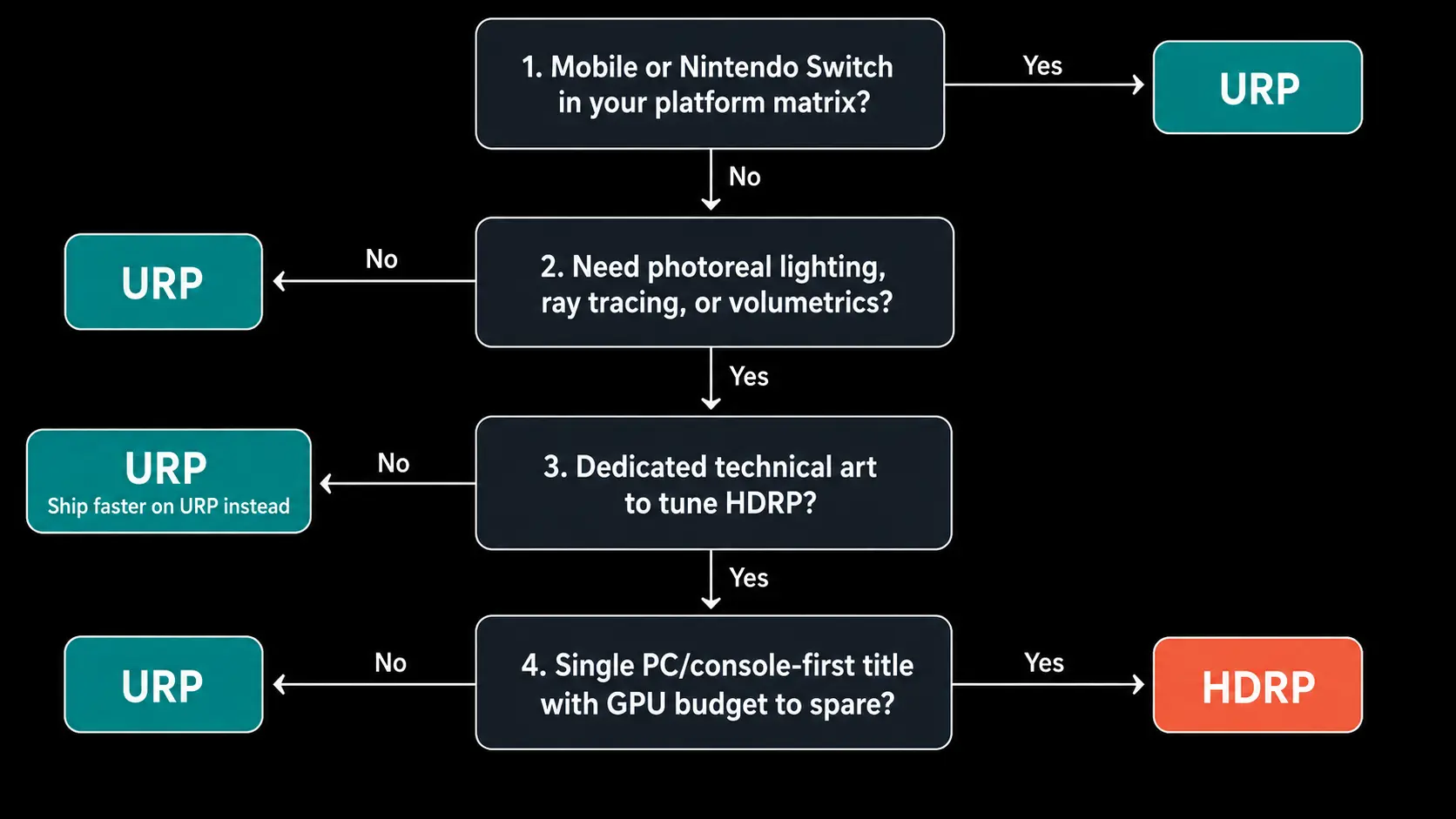
Match the pipeline to four factors, in this order: target platform, the visual bar the game actually needs, your team’s technical-art depth, and how long the project has to live before a migration becomes unavoidable.
- Target platform first. If mobile or Switch is anywhere in your platform matrix, that constraint usually decides the pipeline before visual ambition even enters the conversation, because HDRP simply isn’t viable on that hardware.
- Visual bar second, and be honest about what the game needs, not what would look impressive in a trailer. A stylized, readable, high-frame-rate competitive title rarely needs HDRP’s feature set; a narrative single-player PC or console title built around lighting and atmosphere often does.
- Team depth third. HDRP’s feature set assumes a technical artist who can tune volumetrics, exposure, and ray tracing settings without spending weeks fighting the pipeline. A small team without that bench will often ship faster, and look better relative to their budget, on URP, though if HDRP is genuinely the right call for the project, it’s usually more efficient to bring that skillset in on demand than to build it in-house for a single production.
- Project lifespan last. A live-service or long-support title on Built-in today is looking at a mandatory migration before support ends in 2028; factor that cost into the roadmap now rather than treating it as a future team’s problem.
For most funded indie teams shipping cross-platform, URP is the default that requires the least justification to walk away from. For studios building a single, PC or console-first, visually driven title with the GPU budget and technical art staffing to match, HDRP earns its overhead.
Our Pro Feel Golf project, one of our mobile golf simulation titles, shows what that kind of disciplined rendering work looks like in production. The game’s value was tied entirely to how it felt to play: ball trajectory, spin, bounce, club response, so any rendering change that risked altering that feel was off the table. The team modernized the rendering pipeline specifically for current mobile GPU architectures, the same URP-first path this piece recommends for mobile, since HDRP isn’t viable on that hardware, applying changes incrementally and profiling frame rate and memory across both flagship and mid-range Android and iOS devices at every step. Physics behavior was re-validated against baseline recordings from the original build before any visual change shipped. The result: improved course lighting and visual responsiveness with no frame rate regression on the devices players actually use.
What this means for your budget, timeline, and dev partner
The pipeline decision isn’t purely technical: it sets your minimum spec, your QA matrix, and how much specialized rendering expertise your team needs on staff or on call. Get it wrong, and you’re either paying for GPU headroom your players’ hardware can’t use or re-platforming mid-production when a mobile SKU gets added to the roadmap. Studios that bring in outside Unity development support for this stage usually do it specifically to get a pipeline decision and the technical art setup behind it, validated against their real platform matrix before production scales up, not after.
The pipeline call is one piece of a bigger engine strategy. For the wider context on why studios keep defaulting to Unity for cross-platform production, see our look at why leading studios choose Unity for scalable production.
Conclusion: URP or HDRP is no longer a three-way decision
URP and HDRP solve different problems, and as of 2026 the choice is no longer three-way in practice; Built-in is on a clock. If your platform matrix includes mobile, Switch, or broad PC hardware compatibility, URP is the pipeline built for that reality and the one Unity is actively investing in. If you’re shipping a single, high-fidelity PC or console title with the GPU budget and technical art bench to support it, HDRP still delivers a visual ceiling URP can’t match. Either way, make the call early, before art direction and technical scope have baked in assumptions the wrong pipeline can’t support. If you’re not sure which side of that line your project falls on, that’s exactly the kind of scoping conversation worth having with a Unity development partner before production starts.
Frequently Asked Questions
Partially. Unity provides an automated material upgrade path for standard shaders, but custom shaders, complex post-processing stacks, and any Built-in-built-in-specific code need to be rewritten or re-authored for URP’s shader model. Budget for a dedicated migration pass rather than treating it as a one-click conversion, and use Unity’s own migration documentation as the starting checklist.
No. HDRP requires compute shader support and doesn’t run on OpenGL ES devices, which rules out most Android hardware, and it isn’t supported on iOS either. Mobile projects should use URP.
It can get close for the right art direction. URP now supports dynamic global illumination, screen-space reflections, and physical light units, features Unity is actively expanding as part of its 2026 roadmap, but it still doesn’t match HDRP’s ray tracing and volumetric feature depth. Stylized and mid-fidelity AAA-adjacent titles do well on URP; ray-traced photoreal titles still need HDRP.
Nothing changes immediately. Built-in ships in Unity 6.7 LTS and is officially supported at least through 2028 (2029 on Enterprise or Industry licenses), but Unity has confirmed no new features are planned and a final removal version hasn’t been set. Live games can keep shipping on Built-in in the near term, but new projects shouldn’t start there.
Yes, as of Unity 6.5. Unity is rolling out official HDRP support for Nintendo Switch 2 developers in 2026, in addition to existing URP support, a change from earlier in the Switch 2’s life when HDRP wasn’t a supported path.
It depends heavily on shader complexity and project size, but it’s rarely a quick task. Custom shaders, lighting setups, and post-processing all need re-validation, and QA has to re-pass every affected platform. Studios usually scope this as a dedicated production phase, not a background task squeezed into an existing sprint.
Related Posts

5 Unity Studios in India: 2026 Comparison Guide
Unity has quietly become the backbone of modern mobile and cross-platform game production. From live-service mobile titles to scalable PC builds, it’s no longer just about using Unity. It’s about whether a studio can ship, scale, and sustain production without cracks showing later.
URP vs HDRP vs Built-in: Choosing the Right Unity Render Pipeline for Your Game
If you’re scoping a new Unity project this year, “which render pipeline” has become a decision with a shelf life, not a technical checkbox you tick and move past. Unity’s 2026 strategy shift narrowed the field: Built-in is being phased out, HDRP is in maintenance mode gaining only platform reach, and URP is where nearly all of Unity’s engineering investment is going.
A Practical Guide to Unity Game Development in 2026
Unity still matters in 2026 because it sits at the intersection of speed, scale, and accessibility. If you’re building for mobile, experimenting with live features, or shipping across platforms without overextending your team, Unity game development remains one of the most practical paths forward. That relevance is reflected in the broader engine economy as well.