


 Unity
Unity Unreal
 Godot
Godot
 Mobile
 PC
PC Console
 Full-Cycle
 Co-Development
 Outstaffing


Overview
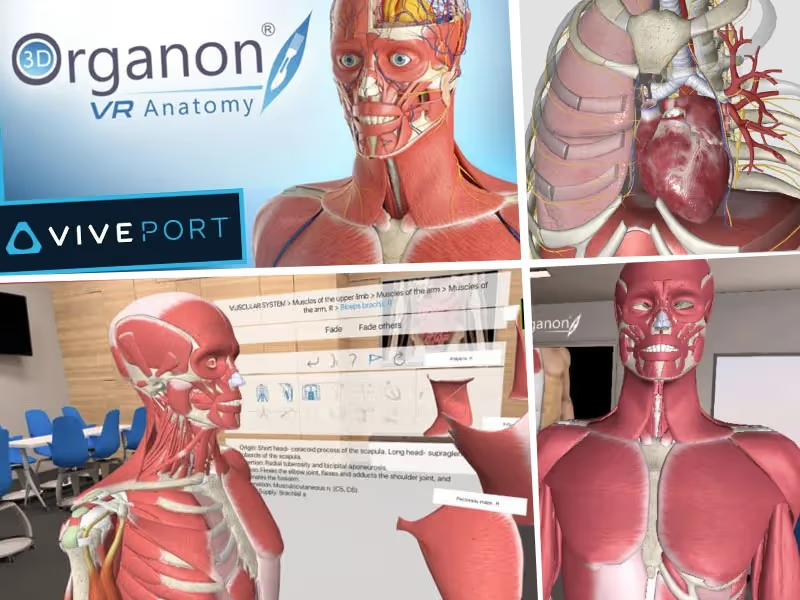
3D Organon is a pioneering virtual reality (VR) application designed to facilitate immersive learning experiences in human anatomy. With over 4,000 medically accurate anatomical structures, this app enables users to interactively explore the human body, perform virtual dissections, view cross-sections of organs, and manipulate high-quality 3D models. The app is equipped with interactive labels, annotations, quizzes, tutorials, and layer controls, catering to different learning styles and supporting multi-user sessions for collaborative learning environments, making it an invaluable tool for educational institutions.
Feature List
- Interactive Exploration: Users can navigate 3D models as if they were in a virtual laboratory.
- Extensive Anatomy Coverage: The app includes over 4,000 anatomical structures, covering all body systems.
- Virtual Dissection Tools: Allows users to peel away layers and examine internal structures.
- Annotations and Labels: Interactive labels and annotations provide detailed information about each structure.
- Cross-Section Views: Offers views of organs and tissues to help users understand their internal organization.
- Educational Resources: Includes quizzes, tutorials, and other resources to enhance learning.
- Layer Controls: Enables users to control the visibility of different anatomical layers.
- Dissection and Reassembly: Users can dissect and reassemble anatomical structures to understand their spatial relationships and functions.
- Support for Different Learning Styles: Allows users to manipulate models and view them from various angles.
- Multi-User Sessions: Enables collaborative learning experiences for classrooms and study groups.
Technical Challenges and Solutions
1. Rendering High-Quality Models
Challenge
Rendering over 4,000 high-quality anatomical models in real-time within a VR environment posed a significant challenge. The models needed to be highly detailed to maintain medical accuracy, but rendering such complex structures in real-time required substantial computational power.
Solution
The development team optimized the 3D models for real-time rendering by reducing polygon counts without altering required detail. Advanced (LOD) techniques were implemented to adjust the complexity of the models based on their distance from the camera. Unity3D’s built-in optimization tools, such as Occlusion Culling and Mesh Baking, were employed to enhance performance further. Additionally, GPU instancing was used to render multiple instances of the same geometry efficiently.
2. Ensuring Medical Accuracy
Challenge
Ensuring that the anatomical models were medically accurate required collaboration with medical professionals SME’s. The models needed to accurately represent human anatomy, which required extensive validation and iterative refinement.
Solution
The development team worked closely with a panel of medical experts who reviewed the models at each stage of development. A feedback loop was established where the models were iteratively refined based on expert input. With custom asset pipeline facilitated easy updates and integration of revised models, ensuring that the app maintained high standards of medical accuracy.
3. Implementing Interactive Features
Challenge
Adding interactive features such as virtual dissection tools, cross-sectional views, and interactive labels required complex programming and user interface design.
Solution
Robust scripting capabilities were leveraged to develop these interactive features. Custom shaders were written to enable virtual dissection and cross-sectional views, allowing users to peel away layers and view internal structures. Interactive labels and annotations were implemented using UI system, ensuring they were easily readable and contextually relevant. The development team also utilized Unity’s physics engine to simulate realistic interactions with the anatomical models.
4. Optimizing for VR Performance
Challenge
VR applications require maintaining a high frame rate to prevent motion sickness and provide a smooth user experience. Balancing the detailed anatomical models and interactive features with the need for high performance was challenging.
Solution
The team utilized Unity3D’s VR-specific optimizations, such as Single Pass Stereo Rendering and Adaptive Quality, which dynamically adjusted rendering quality based on performance. Performance profiling tools within Unity were used to identify and address bottlenecks. The application was rigorously tested on various VR hardware to ensure consistent performance across different devices.
5. Supporting Multi-User Sessions
Challenge
Enabling multi-user sessions for collaborative learning required implementing a robust networking solution to synchronize interactions and ensure real-time collaboration.
Solution
Networking framework, Photon Unity Networking (PUN), was used to implement multi-user functionality. PUN provided a scalable solution for real-time communication between users, ensuring that interactions were synchronized across different devices. The development team also implemented voice and text chat features to facilitate communication among users during collaborative sessions.
Conclusion
The development of the 3D Organon VR platform using the Unity3D engine exemplifies the integration of advanced technical solutions to overcome significant challenges. By optimizing high-quality anatomical models, ensuring medical accuracy, implementing interactive features, optimizing VR performance, and supporting multi-user sessions, the development team successfully created an immersive and educational VR application. 3D Organon stands as a testament to the potential of VR in revolutionizing education, offering an interactive and engaging way for users to explore and learn about human anatomy.
ABOUT JUEGO

+
Teams

+
Apps & Games

+
Years in Market

+
Client