

 Unity
Unity Unreal
 Godot
Godot
 Mobile
 PC
PC Console
 Full-Cycle
 Co-Development
 Outstaffing



-
 Art & Design
 Jan 6th, 2026
- Share:
Table of Contents
- A Quick Overview
- The Engine Foundation: Where Everything Begins
- The 3D Modeling Essentials
- Texturing: The PBR Revolution
- The Procedural Revolution
- Concept Art and 2D Tools
- AI Tools: Reality Check Required
- Budget Reality by Studio Size
- Game Art Production Pipeline
- Other Essential Tools Worth Knowing
- Conclusion and Future Insights
Your game engine just crashed for the third time today. Your textures look flat. Your character models take weeks to iterate. Sound familiar? The difference between shipping your dream game and abandoning it in frustration often comes down to one thing: the right art and design tools.
The landscape for tools for digital artists has transformed dramatically. Unreal Engine now commands 65% adoption among professional developers, procedural workflows have moved from niche to necessity, and AI-enhanced art and design tools have infiltrated 73% of studios. But here’s the real story—studios using optimized tools for the visual arts report 40% productivity gains and 30% fewer do-overs. That’s the difference between launching on time and burning through your budget.
This guide is designed for game creators choosing tools that directly impact production speed, visual quality, and cost efficiency. Whether you’re a solo indie developer working with a $0 budget or leading an AAA team investing $15,000 per artist annually, you’ll discover exactly which software combinations deliver measurable results. We’ll break down the essential tools across five critical pipeline stages—game engines, 3D modeling, texturing, procedural generation, and concept art—with specific budget recommendations, ROI analysis, and workflow integration strategies.
You’ll learn which tools pay for themselves in weeks, where AI actually helps (and where it fails), and how to build a complementary toolkit that accelerates your production timeline without unnecessary costs.
A Quick Overview
Below is a comprehensive list of game art and design tools of 2026:
| Tool Name | Category | Pricing | Primary Use Case |
| Unreal Engine | Game Engine | Free (5% royalty >$1M) | AAA 3D development, real-time rendering |
| Unity | Game Engine | Free (Pro: $183/mo) | Cross-platform 2D/3D mobile games |
| Godot | Game Engine | Free | Open-source 2D/3D indie development |
| Blender | 3D Suite | Free | Modeling, sculpting, rigging, rendering |
| ZBrush | 3D Sculpting | $40/mo or $895 perpetual | High-detail organic character sculpting |
| Maya | 3D Animation | $225/mo | Character rigging and complex animation |
| Houdini | Procedural | $30/mo (Indie) or $269/mo | Procedural environments and asset gen |
| Substance Painter | Texturing | $48/mo (Adobe) | PBR texture painting for game assets |
| Substance Designer | Texturing | $48/mo (Adobe) | Procedural material and texture creation |
| Adobe Photoshop | 2D Art | $21/mo | Concept art, UI design, texture editing |
| Clip Studio Paint | 2D Art | $50 one-time (PRO) | Digital painting with animation |
| Aseprite | 2D Art | $20 one-time | Pixel art sprites and animation |
| Stable Diffusion XL | AI Art | Free | Concept art generation with control |
The Engine Foundation: Where Everything Begins
Your choice of game engine determines not only rendering capabilities but also how smoothly your art pipeline integrates from concept to final build. Following trends in the gaming industry, real-time rendering and cross-platform deployment have become non-negotiable requirements for modern studios.
1. Unreal Engine 5
Unreal Engine 5 has become the AAA standard for good reason. With 28% of Steam’s revenue share and climbing, it’s not just popular—it’s transforming how games look. Nanite handles millions of polygons without the traditional optimization headaches, while Lumen delivers real-time lighting that once required hours of baking.
For your art pipeline, Unreal’s advantages are concrete:
- Native Houdini Engine integration for procedural assets
- Seamless Substance Painter imports with automatic material bindings
- MetaHuman character creation in minutes instead of weeks
- Industry-leading shader systems for photorealistic rendering
2. Unity
Unity still leads mobile development with over 70% market share and 53% overall developer adoption. It’s your go-to for cross-platform projects, especially when targeting iOS, Android, and console. The Asset Store ecosystem gives indie teams instant access to pre-built solutions that would take months to create from scratch.
3. Godot
Godot has surged to 15-21% adoption in specialized sectors as the open-source alternative. It’s free, lightweight, and perfect for stylized games—but expect limited integration with professional art and design tools compared to the big two.
The 3D Modeling Essentials
Professional 3D modeling tools form the backbone of any game art services pipeline, whether you’re creating characters in-house or outsourcing to specialized character design services. These tools determine how quickly you can iterate and how much detail you can achieve.
1. Blender
Blender remains the most remarkable value in game development—completely free yet comprehensive enough that major studios use it alongside proprietary pipelines. You get modeling, sculpting, rigging, animation, and rendering in one package. The learning curve is steep, but the community support is exceptional.
2. Maya
Maya dominates character animation and rigging for a reason. If your game features complex character motion or cinematic cutscenes, Maya’s sophisticated constraint systems and MEL scripting capabilities justify the cost. It’s the industry standard that recruiters expect on resumes.
3. ZBrush
ZBrush remains uncontested for organic sculpting. When you need characters with millions of polygons and intricate detail, nothing else comes close. Just remember you’ll need retopology before your sculpts become game-ready—ZBrush creates the vision, other tools make it functional.
Texturing: The PBR Revolution
Modern texturing workflows have evolved beyond simple color maps to embrace physically-based rendering—the foundation of contemporary 3D art styles. Whether you’re creating photorealistic environments or stylized characters, PBR texturing ensures consistent material behavior across all lighting conditions.
1. Substance Painter
Substance Painter transformed game texturing by making physically-based rendering intuitive. You paint diffuse, roughness, metallic, and normal maps simultaneously, with real-time feedback. Smart materials and weathering effects that once took hours now happen with a few clicks.
2. Substance Designer
Substance Designer complements Painter with procedural texture generation. Instead of painting unique textures for every asset, you create material systems that generate infinite variations. One desert sand material adjusts for grain size, weathering intensity, and color—ideal when you need visual variety without asset bloat.
The Procedural Revolution
Procedural generation represents one of the most significant shifts in game development workflows. Studios implementing Houdini report dramatically faster iteration times and unprecedented flexibility when art direction changes mid-production—a common challenge in the fast-paced gaming industry.
Houdini
Houdini has evolved from a VFX specialty tool to a game development necessity. Major studios, including Juego Studios, Guerrilla Games, and Ubisoft, now embed procedural workflows into standard pipelines.
What Houdini enables:
- Complex environments generated with adjustable parameters
- Procedural-level design tools that designers use directly in-engine
- Automatic asset variants (100 unique trees from one definition)
- Reversible changes without destructive editing
- The Houdini-Substance-Engine integration creates magic.
Houdini generates geometry variants, Substance applies procedural texturing, then everything exports as game-ready assets. Studios report a 30-50% reduction in asset creation time once teams master the workflow.
Yes, the learning curve is brutal. The node-based interface requires fundamentally different thinking than traditional 3D tools. But the payoff is dramatic—especially when creative direction changes late in production, and you can adjust parameters instead of rebuilding from scratch.
Concept Art and 2D Tools
The foundation of any successful game starts with strong visual development. Exploring different concept art styles early in production prevents costly revisions later, making the right 2D tools critical for establishing art direction before 3D production begins.
1. Adobe Photoshop
Adobe Photoshop remains irreplaceable as one of the best tools for digital illustration, moodboards, and UI design. Its brush library and layer-based workflow make it the standard for art direction and visual development. Every portfolio review requires proficiency in Photoshop, making it an essential tool for illustrators working in gaming.
2. Clip Studio Paint
Clip Studio Paint offers a cost-effective alternative with strong animation features, including bone-based rigging that Photoshop lacks. It’s beloved by 2D animators and comic artists, ranking among the best tools for digital artists who prioritize illustration and frame-by-frame animation.
3. Aseprite
Aseprite dominates pixel art with sprite sheet management and animation timelines that enable rapid iteration on retro-style games. For pixel-focused projects, it’s one of the most efficient concept art tools available.
AI Tools: Reality Check Required
The AI hype needs context. Studios have reached consensus on appropriate use cases—and limitations for these emerging art and design tools.
Where AI actually works:
- Concept acceleration: Generate 50 mood board variations in 2 hours instead of 2-3 days
- Asset base generation: Create foundation meshes that artists refine
- Texture reference: AI weathering patterns as inspiration for hand-painted work
- Style exploration: Rapid iteration on aesthetic direction
Where AI still fails:
- Finished asset production (87% of developers confirm significant human refinement required)
- Anatomical accuracy and physics consistency
- Brand consistency across hundreds of assets
- Proprietary IP protection (most avoid Midjourney due to data retention)
Stable Diffusion SDXL leads for professional work due to its open-source nature and ControlNet support.
The verdict: AI excels at ideation, not production. Keep humans in control of final quality when working with these experimental tools in the visual arts.
Budget Reality by Studio Size
Understanding tool costs versus capability helps you make strategic investments. Whether you’re exploring game visual effects or building complete character design services pipelines, matching tools to your budget and team size ensures sustainable growth without overspending.
Indie developers can start with $0-$500 annually: Blender (free), GIMP or Aseprite ($0-$20), Unreal/Unity (free). These are the best tools for digital artists, enabling professional-quality production without software costs. Add Houdini Indie ($365) when revenue supports procedural investment.
Mid-tier studios (10-50 people) should budget $5,000-$8,000 per seat: Maya ($2,700), Substance via Adobe ($660), Houdini Commercial ($3,228). This combination of art and design tools balances professional capability with cost control.
AAA studios invest $8,000-$15,000 per artist: Comprehensive suites including Maya, ZBrush, MotionBuilder, Substance, and Houdini. Negotiate volume licensing for 20-40% discounts on these professional tools for the visual arts.
Game Art Production Pipeline
Understanding how tools connect across production stages prevents bottlenecks and ensures smooth handoffs between departments. A well-designed pipeline integrates concept art, modeling, texturing, and engine implementation seamlessly.
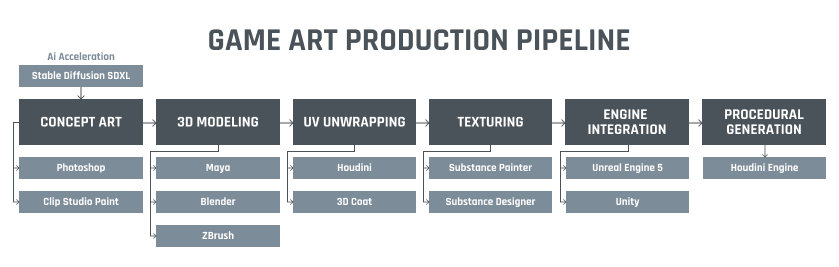
Other Essential Tools Worth Knowing
While the core pipeline tools get most of the attention, specialized software can solve specific production challenges or fill budget gaps. These alternatives and complementary tools deserve consideration based on your project’s unique requirements, whether you need motion capture processing, high-resolution texture painting, or specialized 2D animation workflows.
| Tool Name | Category | Primary Use Case | Pricing | Best For |
| 3ds Max | 3D Modeling | Environment and prop modeling | $225/month | Architectural viz, legacy pipelines |
| GIMP | 2D Art | Free raster image editing | Free | Budget-conscious raster editing |
| Krita | 2D Art/Animation | Painting with animation timeline | Free | Free digital painting + animation |
| GameMaker Studio | Game Engine | Drag-and-drop 2D development | $5-$80/month | 2D games, rapid prototyping |
| Spine | 2D Animation | Skeletal 2D character animation | $69-$299 one-time | Mobile games, reduced file sizes |
| Adobe Animate | 2D Animation | Frame-by-frame vector animation | $22.99/month | Vector-based animation |
| Toon Boom Harmony | 2D Animation | Professional cartoon production | $27-$124/month | TV/film-quality 2D animation |
| Moho | 2D Animation | Bone-based 2D character animation | $79.99-$399.99 one-time | Budget bone-rigging alternative |
| Pencil2D | 2D Animation | Frame-by-frame hand-drawn animation | Free | Traditional animation purists |
| OpenToonz | 2D Animation | Professional 2D vector/raster workflows | Free | Studio Ghibli-style workflows |
| MotionBuilder | 3D Animation | Motion capture processing | $215/month | AAA mocap data cleanup |
| 3DCoat | Texturing/Sculpting | Voxel sculpting + UV unwrapping | $379 perpetual | All-in-one sculpting solution |
| ArmorPaint | Texturing | Budget PBR texture painting | $17.99 perpetual | Indie PBR on a budget |
| Mari | Texturing | High-res UDIM texture painting | $275/month | Film-quality ultra-high-res textures |
| Quixel Mixer | Texturing | Megascans material blending | Free (beta) | Photorealistic scanned materials |
| Daz Studio | 3D Characters | Character customization and posing | Free | Rapid character prototyping |
| Flux.1 Dev | AI Art | Photorealistic concept generation | Varies | AI photorealism for concepts |
| DALL-E 3 | AI Art | Detailed concept art from prompts | $20/month (ChatGPT Plus) | Prompt-accurate concept exploration |
| BRIA | AI Art | Licensed data AI art generation | $7,500/month custom | IP-compliant AI for AAA studios |
3D Modeling & Sculpting Alternatives
- 3ds Max remains the go-to for architectural visualization and environment modeling, especially in studios with legacy pipelines. While Blender increasingly competes in this space, many established teams continue using 3ds Max for its robust modifier stack and proven production workflows.
- 3DCoat offers a unique combination: voxel-based sculpting plus UV unwrapping in one package. It’s ideal for artists who want an all-in-one sculpting solution without juggling multiple applications.
Free 2D Art Solutions
Budget-conscious creators have solid alternatives to premium software:
- GIMP provides complete raster image editing capabilities as a Photoshop alternative
- Krita excels at digital painting with built-in animation timeline support—perfect for indie developers
2D Animation: From Simple to Professional
For skeletal animation:
- Spine dramatically reduces file sizes compared to frame-by-frame sprites, making it essential for mobile games where performance matters
For professional cartoon production:
- Toon Boom Harmony leads the industry with vector and raster workflows used in TV and film animation
- Moho offers budget-friendly bone-based rigging
For traditional frame-by-frame work:
- Pencil2D and OpenToonz serve animation purists who prefer hand-drawn techniques without cost barriers
- Adobe Animate handles professional vector-based frame animation
Advanced Texturing Options
Beyond Substance Painter, consider these specialized tools:
- Mari: Handles ultra-high-resolution UDIM workflows for film-quality assets where 8K+ textures are standard
- ArmorPaint: Delivers budget-friendly PBR painting for indie teams
- Quixel Mixer: Excels at blending photorealistic scanned materials from the Megascans library
Motion Capture & Character Tools
- MotionBuilder specializes in processing motion capture data for AAA studios capturing live actor performances. It’s the industry standard for cleaning and adapting mocap to game-ready skeletal systems.
- Daz Studio accelerates character creation through extensive customization libraries—particularly useful for rapid prototyping when outsourcing character design services isn’t feasible.
2D Game Development
- GameMaker Studio serves developers seeking drag-and-drop simplicity without sacrificing power. Notable games built with it include Undertale and Hotline Miami, proving its capability for commercial releases.
AI Tools Breakdown
Each AI tool serves different needs:
- Flux.1 Dev: Best photorealism for concept art
- DALL-E 3: Superior prompt adherence and detail generation
- BRIA: 100% licensed training data for studios requiring IP compliance
Conclusion and Future Insights
Proceduralism becomes standard practice. Houdini literacy will be expected of environment and character artists, not optional. Cloud-based rendering enables remote collaboration without $5,000+ GPU investments. AI tools mature from experimental to operational—expect fine-tuned proprietary models and automated QA bots by late 2026.
The “best” combination of art and design tools doesn’t exist in isolation.
Success requires strategic selection of complementary software addressing your specific needs while respecting budget and team expertise. Studios winning in 2026 combine industry-standard professional tools for illustrators and concept artists with emerging procedural workflows and measured AI integration—always keeping human creativity as the irreplaceable core.
The 40% productivity gains reported by early adopters prove that tool investment returns multiples through operational efficiency and faster time-to-market. Whether you’re selecting concept art tools for visual development or comprehensive tools in the visual arts for full production pipelines, your game deserves the right art and design tools. Your deadline demands them.
Frequently Asked Questions
Adobe Photoshop leads for concept art tools, while Clip Studio Paint excels for animation-focused work. Aseprite dominates pixel art as an essential tool for illustrators in gaming.
No. Blender, GIMP, and Krita provide professional-quality art and design tools for free. However, specialized tools for the visual arts deliver 40% gains in productivity for scaling studios.
Use Adobe Photoshop or Procreate as primary concept art tools. Add Stable Diffusion SDXL for rapid ideation—the best tools for digital artists prioritize speed and exploration.
Follow five stages: concept (Photoshop), modeling (Blender/Maya), texturing (Substance), animation (Maya/MotionBuilder), and engine integration (Unreal/Unity) using consistent file formats and naming conventions.
Partner with experienced game art services providers who maintain optimized tool pipelines and trained specialists, reducing your software licensing costs while accelerating production timelines.
Related Posts
How to Evaluate a Game Art Outsourcing Partner in 2026
Discover the top game art outsourcing companies, offering a wide variety of services that make your project stand out. Game art types like 2D, 3D as well as Low Poly, Cartoon, and Hand-Painting- our experts can create them all using tools like Maya, Blender, and others, resulting in tailor-made vivid visuals for the project.
Art Direction in Games: How to Lock a Visual Style Before Production
Locking your game’s art direction is a pre-production decision, not something you discover while assets ship. The short answer: pick the direction on a small set of hero assets before scaling to full production, write it down as a working reference rather than a mood board, and put one named owner in charge of holding it as the asset count grows. Skip any of those three, and the style call you make in week one turns into a rework bill you’re still paying months later, once outsourced artists and a growing team are all touching the same asset set.
3D Game Art Outsourcing in 2026: Costs, Execution Models, & Partner Evaluation Explained
Visual standards in games have escalated sharply. High-poly characters, cinematic environments, real-time lighting pipelines, and engine-optimized assets are now baseline expectations, not premium features. Internal teams, no matter how strong, cannot expand infinitely without affecting cost structure, delivery speed, or creative consistency.
That reality explains why 3D game art outsourcing has shifted from tactical support to strategic production design. The global 3D game art outsourcing market is expected to reach $2.7 billion by 2028, signaling sustained demand from publishers, studios, and IP owners who need scalable art capacity without destabilizing core teams.
When used correctly, outsourcing does not dilute vision. It protects it. It allows internal leadership to retain art direction while external specialists handle production volume, style replication, and pipeline execution. This guide breaks down how 3D game art outsourcing works in 2026, including costs, engagement models, processes, and the studios that execute at scale.