


 Unity
Unity Unreal
 Godot
Godot
 Mobile
 PC
PC Console
 Full-Cycle
 Co-Development
 Outstaffing





-
 Game Development
 Jan 19th, 2026
- Share:
Table of Contents
- Why HTML5 Game Development Tools Matter More Than Ever
- Code vs. No-Code: Your First Big Decision
- The Powerhouse Engines for Professional Development
- No-Code Platforms: Speed Without Programming
- Specialized Tools: Performance and Collaboration
- AI Tools: The Game Development Revolution
- Choosing Your Perfect Toolset
- The Future Is Already Here
Picture this: In just the first six months of 2025, over 15,000 HTML5 games launched—that’s nearly three times more than the entire previous year. Now, as we sit here in early 2026 looking back, the numbers tell an even more compelling story.
The HTML5 games market was valued at $4.22 billion in 2024 and is projected to reach $9.87 billion by 2033, growing at a robust 10.2% CAGR. What changed? Not developer talent or market demand, but something more fundamental: the tools themselves.
Today’s HTML5 game development tools have evolved from basic frameworks into sophisticated ecosystems that handle everything from physics simulation to AI-driven character dialogue. Whether you’re a solo developer with a weekend project or a studio shipping commercial titles, the right toolset can mean the difference between months of grinding and weeks of focused creativity.
This guide cuts through the noise to show you what actually works. We’ll explore the engines powering thousands of successful games, reveal how AI tools are slashing production timelines by 30-50%, and help you choose the perfect platform for your specific needs—whether you write code or prefer visual editors.
Why HTML5 Game Development Tools Matter More Than Ever
As we move into 2026, HTML5 momentum shows no signs of slowing. But here’s what the numbers don’t immediately reveal: this growth isn’t driven by bigger budgets or larger teams. It’s powered by smarter tools.
Modern HTML5 game development software has fundamentally changed what’s possible for individual developers and small studios. You no longer need years of programming experience to build functional games, expensive desktop software, or proprietary platforms, separate builds for mobile, desktop, and web, or massive teams to handle asset creation and testing.
The secret? HTML5 games run directly in web browsers across every device—smartphones, tablets, desktops—without downloads or installations. This instant accessibility transforms everything about game distribution and player acquisition.
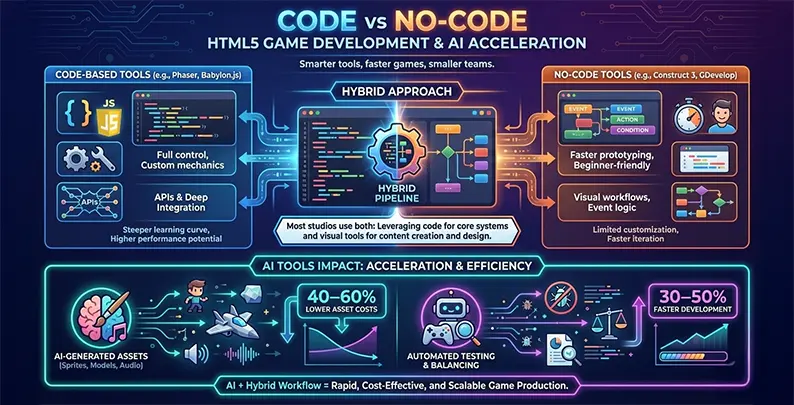
Under the hood, WebGL (a JavaScript API that leverages GPU hardware acceleration) makes this magic happen. With a browser compatibility score of 92/100, WebGL works seamlessly across Chrome, Firefox, Safari, and Edge. Build once, deploy everywhere. That’s not a marketing slogan—it’s the actual development reality.
Code vs. No-Code: Your First Big Decision
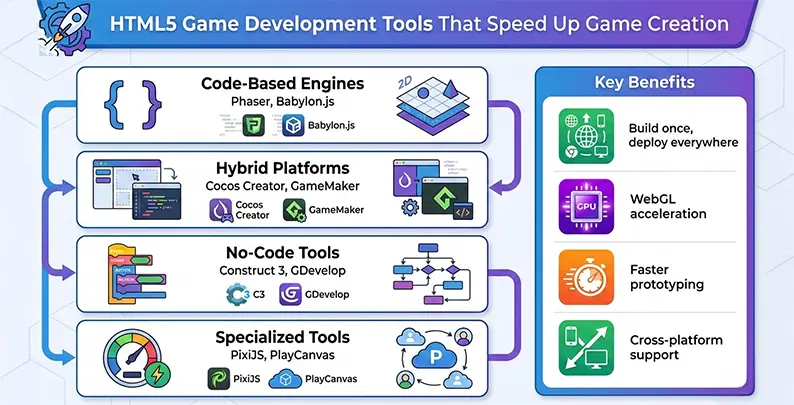
Before diving into specific tools, you need to answer one fundamental question: Do you want to write code or work visually?
- Code-based engines give you maximum control. You write JavaScript, access the engine’s API directly, and implement exactly what you envision. The learning curve is steeper, but the creative ceiling is unlimited. Perfect for developers who want precise control over every mechanic.
- No-code platforms prioritize speed and accessibility. They replace programming with visual event systems—drag-and-drop interfaces where you specify “when player collides with enemy, subtract health.” Non-programmers can build functional prototypes independently, dramatically compressing iteration cycles.
Here’s what many successful studios do: they use both. No-code platforms for rapid prototyping and quick experiments. Code-based engines are used when projects mature and need optimization or custom features. This hybrid approach combines speed with control.
The Powerhouse Engines for Professional Development
1. Phaser: The 2D Champion
Phaser dominates the 2D space, accounting for 7.1% of all new HTML5 releases. This open-source JavaScript framework excels at arcade-style games, casual titles, and physics-based experiences.
Why developers love Phaser:
- Comprehensive 2D features out of the box—sprite management, physics engines (Arcade and Matter.js), animation systems, input handling
- Pre-built components for common mechanics like jumping, collision detection, and particle systems
- Extensive documentation with hundreds of tutorials and an active community forum
- WebGL rendering with automatic Canvas fallback for older browsers
The learning curve is moderate—you need JavaScript fundamentals but not 3D graphics expertise. For teams building quick-turnaround 2D titles or prototyping complex mechanics, Phaser remains unmatched. You focus on unique gameplay instead of rebuilding foundation systems from scratch.
2. Babylon.js: Enterprise-Grade 3D
When you need serious 3D capabilities—think architectural visualizations, complex simulations, or immersive experiences—Babylon.js delivers. Developed and maintained by Microsoft, this engine brings console-quality graphics to the browser.
What sets Babylon.js apart:
- Physically-based rendering, real-time ray tracing (with appropriate hardware), volumetric lighting, and sophisticated particle effects
- Web-based visual editor for real-time iteration without external modeling software
- WebGL and WebGPU support for modern hardware acceleration
- Built-in debugging tools and profiling capabilities
The steeper learning curve reflects the inherent complexity of 3D development. But for ambitious projects that demand high-fidelity visuals, Babylon.js offers professional-grade capabilities previously confined to desktop and console engines.
3. Cocos Creator: The Best of Both WorldsCocos
Creator bridges the gap between code-heavy engines and no-code platforms. It combines a sophisticated visual editor with TypeScript scripting capabilities, capturing 8.1% of new releases.
The workflow is elegant: designers use the intuitive drag-and-drop interface to layout scenes, arrange UI elements, and configure animations—no coding required. Then developers layer TypeScript logic on top, implementing game mechanics, physics interactions, and networking.
This separation of concerns accelerates collaboration. Designers handle visual composition while developers implement behavior. Both work simultaneously without stepping on each other’s toes. The platform supports both 2D and 3D development with integrated physics engines and cross-platform deployment.
No-Code Platforms: Speed Without Programming
1. Construct 3: Zero Code Required
Construct 3 eliminates programming entirely. Instead of writing code, you specify game logic through a condition-action interface: “If player collides with enemy, subtract 10 health points and play damage sound.” The engine automatically translates these visual rules into optimized JavaScript.
Why Construct 3 dominates the indie space (16.4% of new releases):
- Browser-based editor requiring no installation
- Real-time collaboration and cloud storage
- Export options for web, mobile, and desktop
- Speed to functionality—experienced designers prototype playable mechanics in hours, not days
The limitation? Implementing highly custom or unusual features requires more creative workarounds than traditional code-based engines. But for most 2D arcade games, casual titles, and puzzle games, Construct 3 provides everything you need.
2. GDevelop: Open-Source Alternative
GDevelop offers similar no-code capabilities, with a crucial difference: it’s completely open source. The community actively shares game templates, asset packs, and sample projects.
For budget-conscious indie developers or educational settings, GDevelop removes licensing costs entirely while maintaining professional capabilities. Many developers follow a structured HTML5 game development process to maximize their efficiency with these tools.
3. GameMaker: Professional Hybrid
GameMaker combines visual drag-and-drop development with GML (GameMaker Language), a C-like scripting language. Start with visual prototyping for speed, then add GML when you need precise control.
The extensive asset marketplace and active community make it reliable for teams wanting balanced productivity. Many successful indie games have been built using this approach, proving its commercial viability.
Specialized Tools: Performance and Collaboration
1. PixiJS: Pure Rendering Speed
PixiJS is a lightning-fast 2D rendering engine optimized for sprite-heavy games. While lacking full engine features like built-in physics, PixiJS excels at raw rendering performance—thousands of sprites at 60 FPS even on modest hardware.
Developers layer additional libraries on top (for physics, sound, input), gaining ultimate architectural flexibility. For particle-heavy shooters or effects-driven experiences, PixiJS eliminates unnecessary overhead and maximizes frame rates.
2. PlayCanvas: Collaborative Cloud Development
PlayCanvas revolutionizes team collaboration through browser-based development. Multiple developers edit the same 3D project simultaneously—like Google Docs for game development.
Changes propagate in real-time, eliminating tedious file merging. No installation overhead means developers can access the editor from any device, any location. PlayCanvas handles asset hosting, version control, and cloud build services automatically. Perfect for remote studios needing friction-free collaboration and deployment.
AI Tools: The Game Development Revolution
Artificial intelligence is transforming HTML5 game development tools by automating tasks that traditionally consumed 40-60% of production schedules.
AI-powered asset creation has arrived:
- Scenario generates game-ready sprites and textures from text prompts, maintaining consistent style across hundreds of assets
- 3DFY.AI converts descriptions into fully rigged, textured 3D models—”a fantasy warrior holding a sword” becomes an export-ready model in minutes
- Leonardo.ai accelerates 2D concept iteration, generating dozens of design variations for rapid exploration
Intelligent NPC behavior through Inworld AI eliminates the need for thousands of dialogue branches. Define character archetypes and background; Inworld generates contextually appropriate responses, extending to voice synthesis and narrative generation.
Automated quality assurance via Modl:test applies AI agents to simulate player behavior and detect bugs systematically. Testing data shows this reduces bug discovery timelines by 40-60%, accelerating shipping schedules.
The impact? Industry reports indicate AI-assisted workflows reduce production timelines by 30-50% and lower creative asset costs by 40-60%. For indie developers on constrained budgets, this transforms feasibility—12-month projects might ship in 6 months with strategic AI integration.
Choosing Your Perfect Toolset
Select code-based engines (Phaser, Babylon.js) when you have experienced programmers, need highly customized mechanics, or require granular debugging capabilities.
Choose no-code platforms (Construct 3, GDevelop) when your team includes non-programmers, you’re prototyping concepts quickly, or building games that fit common patterns well-served by pre-built components.
Pick specialized tools (PixiJS, PlayCanvas) for unique technical requirements like extreme rendering performance or real-time collaboration. Understanding the different HTML5 frameworks available helps you evaluate which architecture best suits your technical requirements.
Integrate AI tools across all choices—regardless of engine selection, AI asset generation and automated testing provide meaningful productivity gains.
The Future Is Already Here
The explosive growth of HTML5 games reflects a fundamental democratization. Team size, budget, and prior experience no longer represent immovable barriers. Talented individuals with good ideas can now build, polish, and ship engaging games without massive infrastructure.
Whether coding in Phaser, designing in Construct 3, or accelerating with AI tools, the barrier to entry has never been lower. At Juego Studios, a leading game development studio, we’ve seen that success comes from matching tools to team strengths.
The tools are ready. The community is thriving. Experiment with platforms, build prototypes, and discover your workflow. Ready to bring your game concept to life? An experienced HTML5 game development company can help you navigate the landscape and accelerate your journey from concept to launch.
Frequently Asked Questions
Construct 3 and GDevelop are ideal for beginners as they offer no-code, visual development interfaces. You can create functional games without programming knowledge using drag-and-drop mechanics and event-driven logic systems.
AI tools like Scenario and 3DFY.AI automate asset creation, reducing production timelines by 30-50%. They generate sprites, textures, and 3D models from text prompts, freeing developers to focus on unique gameplay mechanics.
Phaser excels at 2D arcade-style games with built-in physics and sprite management. Babylon.js specializes in high-fidelity 3D experiences with advanced rendering, VR/AR support, and enterprise-grade graphics capabilities for complex simulations.
Yes, HTML5 games run directly in web browsers across all devices—smartphones, tablets, and desktops—without requiring separate builds. This “build once, deploy everywhere” approach dramatically reduces development complexity and costs.
Professional game development services can help evaluate whether Phaser, Babylon.js, or no-code platforms best fit your project scope, team skills, and target platforms for optimal development efficiency.
Related Posts

Have a Game Idea but No Development Team? How to Get It Built
This guide walks you through every realistic way to get your game made, what each one really costs you in time and control, and how to pick the right one before you spend a dollar finding out the hard way.
Top 10 Game Development Companies in USA (2026 Update)
In this blog, we’ll discuss the top 10 game development companies in USA, along with how to evaluate them beyond surface-level claims, so you can identify partners who actually align with your vision, technical needs, and long-term growth goals.

Top Game Development Companies in 2026: 10 Global Leaders Compared
Most game projects don’t fail because the idea was weak. They fail because the development partner couldn’t scale, adapt, or deliver when pressure peaked.