


 Unity
Unity Unreal
 Godot
Godot
 Mobile
 PC
PC Console
 Full-Cycle
 Co-Development
 Outstaffing




-
 iPhone Game Development
 Oct 21st, 2026
- Share:
Table of Contents
- TL;DR
- What are the iOS game development tools a studio actually has to choose from?
- What is the best framework for iOS game development?
- SpriteKit vs SceneKit vs Metal: which one fits your game?
- How does Metal improve iOS game performance?
- Is Swift good for game development?
- What is the best engine for iOS games?
- Unity vs native iOS game development: which approach fits your project?
- Which Apple tools does every iOS game pipeline still depend on?
- How should you choose your iOS game stack?
- What this means for your budget, timeline, and production partner
- Conclusion: let your two-year platform plan pick the stack
You’re about to commit a game and a hiring plan to a set of iOS game development tools. Pick well, and a small team can ship across its target iPhones and iPads. Pick badly, and you may be rewriting the renderer or the input layer in year two. For a 2D, Apple-only game, SpriteKit is a strong starting point. A custom Swift and Metal stack is worth considering when the rendering requirements justify additional engineering. If Android, PC, or console is a realistic next step, an engine like Unity earns its weight. And don’t start new 3D work on SceneKit. The sections below show how to decide, with the trade-offs a technical director and a producer both need to see.
TL;DR
- The iOS game development tools you choose fall into five layers: language, graphics framework, engine, Apple’s pipeline tools, and platform services. Your engine decision settles most of the other four.
- Skip SceneKit for new work. Apple called its deprecation soft and put it in maintenance mode at WWDC 2025. Apple has announced no SpriteKit deprecation, and Metal is where Apple keeps investing, including a redesigned MetalFX upscaler announced at WWDC 2026.
- Native iOS fits Apple-only 2D or modest 3D games built by a small Swift team. Unity fits anything that might reach Android, PC, or console within a couple of years.
- Standard iOS production pipelines run on Apple’s Xcode toolchain on a Mac, local or cloud-hosted, and Xcode 27 needs an Apple silicon Mac on macOS Tahoe 26.6 or later. Starting in April 2027, iOS and iPadOS uploads to App Store Connect must be built with the iOS & iPadOS 27 SDK or later and target iOS 15 or later.
What are the iOS game development tools a studio actually has to choose from?
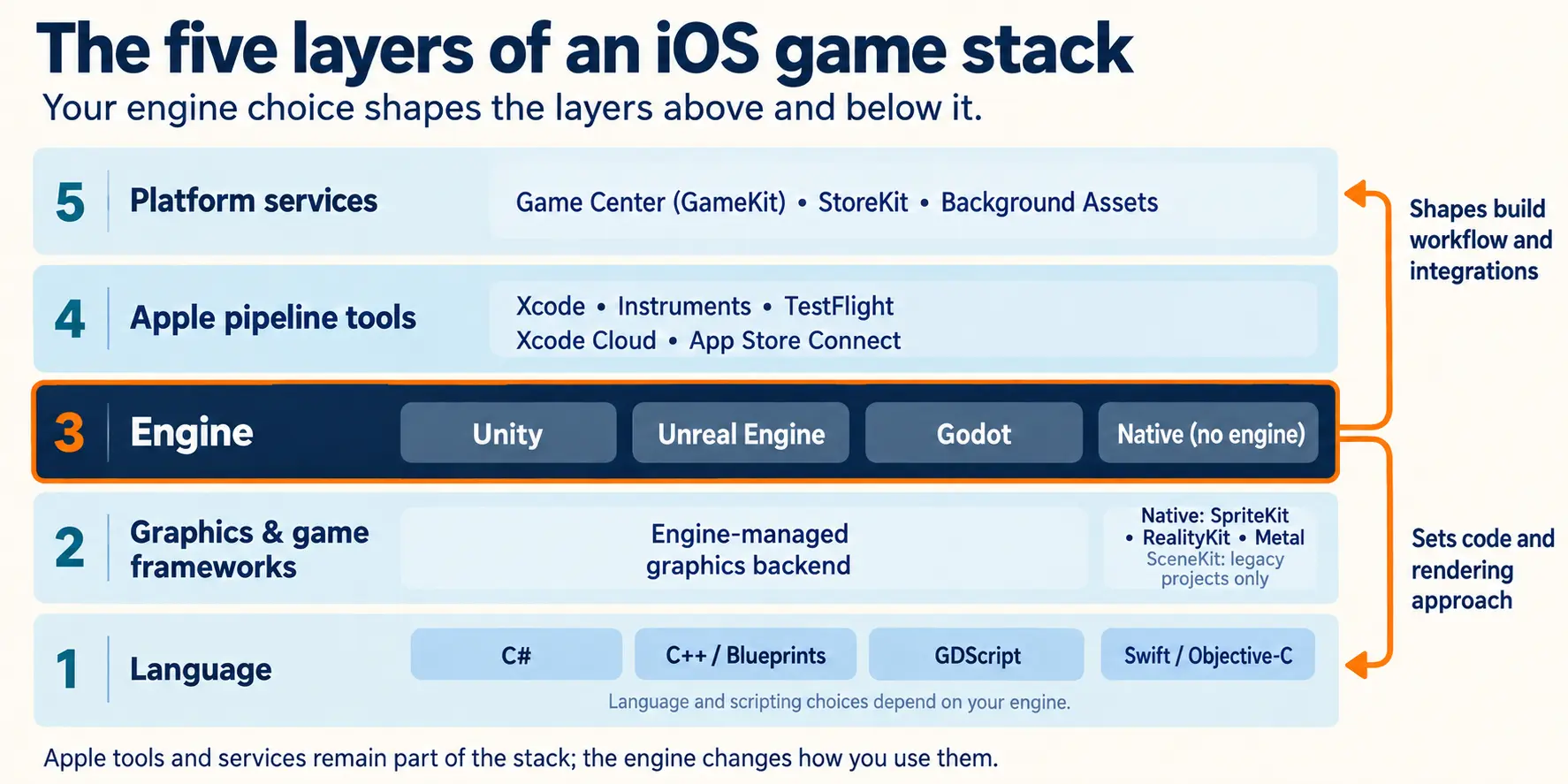
Five layers: language, graphics and game frameworks, engine, Apple’s pipeline tools, and platform services. Most of the argument in any kickoff meeting is about the engine, because that choice quietly settles the language and the framework too.
| Layer | Typical options | Who usually decides |
|---|---|---|
| Language | Swift, Objective-C, C#, C++ or GDScript, depending on the stack; shader languages depend on the framework or engine | Set by your engine, or by the skills you can hire |
| Graphics and game frameworks | SpriteKit, Metal, RealityKit (SceneKit for legacy projects) | Technical director, based on 2D versus 3D |
| Engine | Unity, Unreal Engine, Godot, or none (native) | Studio lead and producer, based on the platform roadmap |
| Apple pipeline tools | Xcode, Instruments, TestFlight, Xcode Cloud, App Store Connect | Apple. Everyone ends up here |
| Platform services | Game Center (GameKit), StoreKit, Background Assets | Product owner, based on engagement and monetization plans |
What is the best framework for iOS game development?
There isn’t one. The right framework follows the dimensionality of your game, how many platforms you ship on, and the skills you can hire. Here are the quick verdicts:
- 2D, Apple-only: SpriteKit is the default. It’s built for this, and your team probably already knows Swift.
- Custom or high-end 3D, Apple-only: Metal, if you can staff graphics engineers. If you can’t, use an engine.
- New native 3D or AR: RealityKit, which is the framework Apple points developers to now that SceneKit is in maintenance mode.
- Several platforms: consider a cross-platform engine. SpriteKit, RealityKit and Metal are Apple-platform technologies, so they do not provide a direct Android or Windows deployment path.
Frameworks give you control and a small footprint. Engines give you editors, asset pipelines and portability.
SpriteKit vs SceneKit vs Metal: which one fits your game?
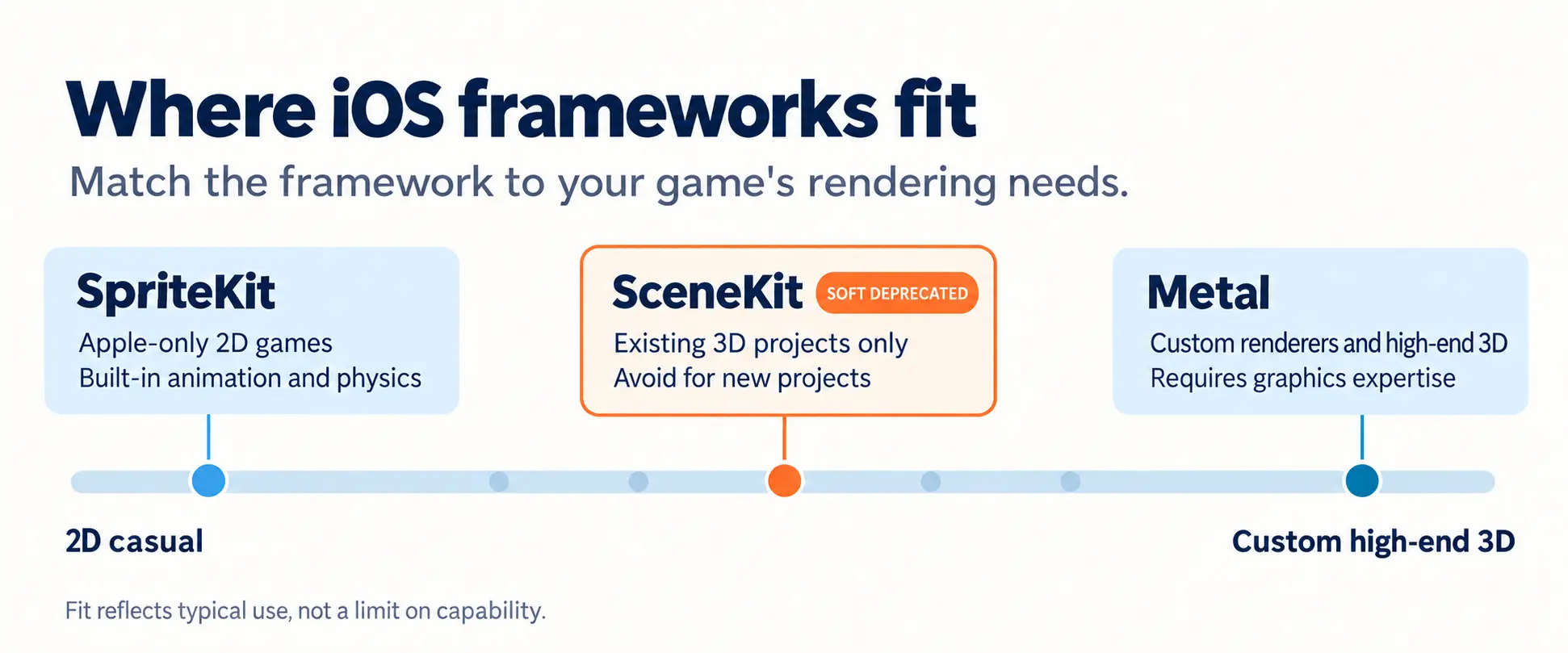
SpriteKit fits 2D games, including games that simulate depth through layering, perspective or pre-rendered artwork. Metal fits teams that need to own the renderer. SceneKit remains usable for existing projects, but Apple recommends against it for new projects or significant updates.
| Criterion | SpriteKit | SceneKit | Metal |
|---|---|---|---|
| Best fit | 2D games, including games that simulate depth using 2D artwork | Existing 3D projects only | Custom renderers and high-end 3D |
| Control | Medium. The framework handles rendering | Medium | Highest. You own the rendering pipeline |
| Skill you need | A Swift generalist | A Swift generalist | A graphics engineer |
| Support status | No deprecation announced | Soft deprecation and maintenance mode since WWDC 2025 | Actively developed: Metal 4 and Metal 4.1 tooling |
| Staffing cost | Low | Low now, with migration debt later | High |
| Typical pitfall | Outgrowing it when 3D or heavy effects enter scope | Starting new work on it | Spending engineer-months rebuilding what an engine already gives you |
SpriteKit: the low-risk 2D default
SpriteKit is a strong option for an Apple-only 2D game. Apple documents it as a high-level framework for 2D rendering, animation, and physics, and no deprecation has been announced. Treat SpriteKit like any dependency: keep your game logic separate from rendering to reduce the work involved if you later change frameworks.
SceneKit: why new projects should skip it
Apple announced SceneKit’s deprecation at WWDC 2025 and called it a soft one. Existing apps continue to work, and Apple has not announced plans to hard-deprecate SceneKit. But the same session says SceneKit is in maintenance mode, with only critical bug fixes, and that for a new app or a significant update SceneKit is not recommended. Apple points developers to RealityKit instead. If you maintain a shipping SceneKit game, budget a migration for a calmer quarter. If you’re starting fresh, don’t borrow that debt.
Metal: control you pay for in engineers
Metal is the layer under everything else on Apple hardware, and using it directly means you own every decision above it: the render loop, the shaders, the memory budget. Studios do it when the look is the product. Everyone else should ask whether that headcount buys something players will notice.
How does Metal improve iOS game performance?
Metal improves iOS game performance by giving your game low-overhead access to the GPU. Using the Metal API for games gives developers control over rendering and GPU resource management, while Metal 4 adds tools to reduce per-frame overhead. Apple says it lets you encode commands and compile shaders more efficiently than ever, and it adds ways to run machine learning inference alongside rendering.
What Metal 4 and MetalFX actually change
MetalFX provides upscaling, frame interpolation, and denoising capabilities. Metal 4 supports devices with A14 Bionic or later and M1 or later chips, but individual MetalFX features have their own hardware and OS requirements. Check feature support on target devices rather than assuming that Metal 4 compatibility enables every MetalFX capability.
At WWDC 2026 Apple added a redesigned MetalFX temporal upscaler that uses the Neural Engine and Neural Accelerators on M5 Pro and M5 Max, so check which of your target devices can use it. It also shipped an improved Metal debugger in Xcode and Metal frame rate data in MetricKit reports, according to Apple’s WWDC26 games guide.
When going direct to Metal is worth the headcount
Go direct when rendering is the product: a distinctive stylized 3D look, a custom lighting model, a technical showcase. Otherwise you inherit Metal through your engine. Unity, for one, uses Metal by default on Apple platforms, so a Unity game benefits without anyone writing Metal code. A dedicated graphics engineer is a real cost, and most game ideas don’t need one.
Is Swift good for game development?
Yes. Swift game development is a strong fit for Apple-only games built with frameworks such as SpriteKit or a custom Metal renderer. It’s a weaker fit when your engine already dictates C# or C++. Swift 6.4 ships inside Xcode 27, and Apple’s own Game Center material shows Swift first, with a C# path for Unity. That tells you where the tooling attention goes.
The question for a producer is whether you can hire for Swift and maintain the platform integrations the game needs. Swift.org publishes a Swift SDK for Android, but the Apple-only frameworks you would build on do not carry over to Android.
What is the best engine for iOS games?
For most studios shipping on more than one platform, Unity. For Apple-only games with small teams, going native. For high-fidelity 3D with a larger team, Unreal. Godot suits lean 2D and teams that want open source.
| Option | Best fit | iOS angle | Watch-out | Licensing |
|---|---|---|---|---|
| Unity | Cross-platform mobile, 2D and 3D | C# code. Renders through Metal by default. Apple now ships official Unity plug-ins for StoreKit and Background Assets | Local builds require macOS and Xcode; cloud iOS builds are available through Unity Build Automation | Check current plan terms before budgeting |
| Unreal Engine | High-fidelity 3D with a larger team | Suited to visually ambitious 3D | Heavier toolchain. Budget profiling time on target iPhones | Standard game royalty: 5% on qualifying worldwide gross revenue beyond the first $1 million in lifetime revenue per product, subject to Epic’s exclusions. Qualifying Launch Everywhere with Epic releases can receive a 3.5% rate. Check the current EULA before budgeting. |
| Godot | Lean 2D and light 3D | Exports a project you open and build in Xcode | Export requires macOS with Xcode installed. C# export to iOS remains experimental and has limitations | MIT license, no royalties |
| Native (SpriteKit, Metal, RealityKit) | Apple-only games, small teams | Direct access to Apple frameworks and no engine runtime | Apple-specific rendering and platform integrations need replacement when expanding beyond Apple platforms. Complex content workflows may require additional tools | No engine fees |
There is no single winner. The best engine for iOS games is the one that matches your platform roadmap and the skills already on your payroll.
Unity vs native iOS game development: which approach fits your project?
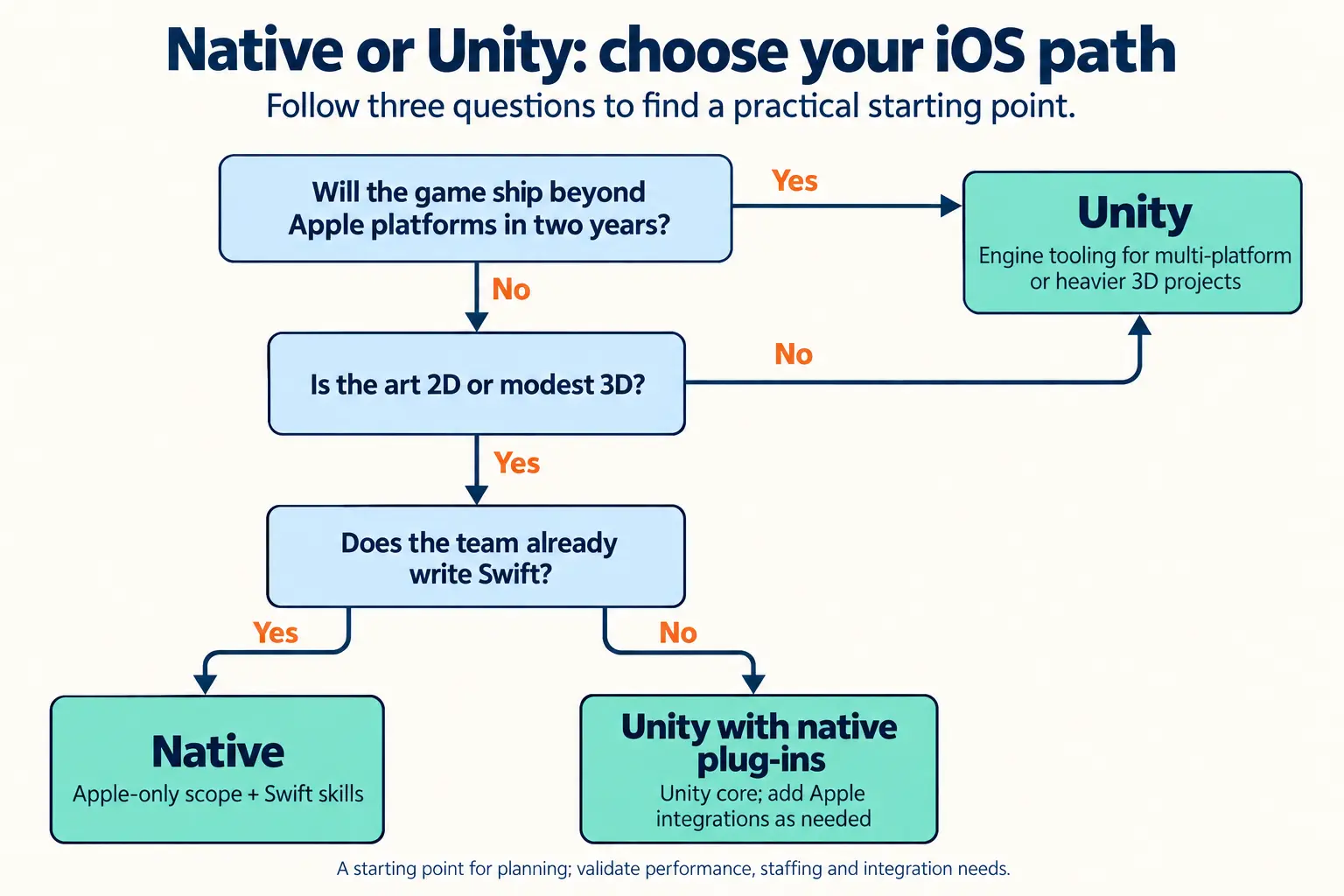
Choose native when the game is Apple-only, the art is 2D or modest 3D, and your team already writes Swift. Choose Unity when Android, PC, or console is realistically on the roadmap in the next couple of years. The wider question of how Unreal, Unity, and native compare across every platform has its own engine breakdown.
| Criterion | Native iOS | Unity |
|---|---|---|
| Platform scope | Apple platforms only | Shared project across iOS, Android, PC and supported consoles; console deployment requires platform-holder approval, SDK access and applicable Unity licensing |
| Content tooling | Apple provides framework-specific tools, including SpriteKit’s Xcode scene editor. More complex content workflows may require additional or custom tools | Editor, asset pipeline, and a large plug-in ecosystem |
| Apple feature access | Direct | Through plug-ins. Apple now ships official ones for StoreKit and Background Assets |
| Skill you need | Swift developers for framework-based games; graphics expertise for custom Metal rendering | C# developers, plus someone who owns the Xcode project |
| Build pipeline | Xcode | Unity generates an Xcode project and Xcode compiles it |
| Cost shape | No third-party engine fees; tooling costs depend on the project | Licensing, plug-in and service costs vary; shared tooling can reduce duplicated work across platforms |
| Rework risk if you expand | Potentially high. Apple-specific frameworks need replacement; platform-independent gameplay logic may be reusable | Often lower than an Apple-specific stack, but platform integration, optimization and testing remain necessary |
When native iOS wins
Native wins when the game is Apple-only, the art is 2D or light 3D, and your team already writes Swift. You skip the engine runtime, get direct access to Apple frameworks, and keep the toolchain short. It’s also the straight answer to SpriteKit vs Unity for iOS games: if the game is 2D and iOS-only, SpriteKit is usually enough, and Unity’s portability is something you’d pay for without using.
When Unity wins
Unity wins when Android, PC, or console is coming; when designers need to iterate in an editor without waiting on engineers; or when you want a mature plug-in ecosystem for analytics, ads, and live operations. Apple has also narrowed the old gap. At WWDC 2026 it announced official Unity plug-ins for StoreKit and Background Assets, which build with Xcode 27, Python 3, and Unity 2022 LTS or later, and Game Center already has a C# route through Apple’s GameKit plug-in on GitHub.
The build still ends in Xcode, though. Unity generates an Xcode project, and Xcode compiles the IL2CPP output and deploys it. A team doing Unity production for iOS still needs someone who owns signing, device testing, and Apple’s SDK deadlines. Unity’s mobile cost and due-diligence picture runs deeper than this piece covers, and budget scoping is where it matters most.
The middle path: Unity Core with native plug-ins, or native first and port later
One compromise is a Unity game with a thin native layer, written in Swift, for the Apple-specific features like Game Center and StoreKit hooks. The other is shipping native first and porting later. Building the Android version of an Apple-native game usually requires replacing Apple-specific rendering, interface, and platform integrations. Well-separated gameplay logic may be reusable, including through Swift’s Android support, but the amount of reuse depends on the architecture and dependencies. Unity first means a lighter Apple-specific layer from day one. Neither is free, so price both before you commit.
Which Apple tools does every iOS game pipeline still depend on?
Xcode, plus the services that wrap around it. These are the Apple game development tools no engine choice removes:
- Xcode. Standard native and engine-based iOS production pipelines depend on Apple’s SDKs and Xcode toolchain, either locally or through Mac-based build infrastructure. Xcode 27 requires an Apple silicon Mac running macOS Tahoe 26.6 or later, and it supports on-device debugging only on devices running iOS 17 or later, so teams that test on older iOS versions need to plan for that. Budget for suitable local hardware or a compatible cloud build service.
- The April 2027 SDK deadline. Starting in April 2027, iOS and iPadOS apps and games uploaded to App Store Connect must be built with the iOS & iPadOS 27 SDK or later and target iOS 15 or later. If your game still supports older iOS versions, check your minimum deployment target before the deadline. This applies to new releases and updates; other Apple platforms have their own corresponding SDK requirements.
- Xcode Cloud, Instruments, and MetricKit. Apple reports Xcode Cloud builds up to twice as fast, with support for Apple Vision Pro and apps using Metal on Apple silicon. MetricKit reports now include Metal frame rate data. Together, these tools cover builds, profiling, and field performance.
- Game Center and GameKit. Leaderboards, achievements, challenges, and matchmaking come from Apple, which means less to build and a consistent player experience. Apple also says games that include Game Center features and In-App Events are prominently displayed across the Games app, which helps players discover them. Apple’s Game Center overview lists the full feature set.
- StoreKit and Background Assets. StoreKit handles purchases. Managed Background Assets can download only the language packs a player needs, which keeps first-launch weight down.
How should you choose your iOS game stack?
Work through four questions in order, and let the first honest answer settle the stack.
- Where will this game ship in two years? If the answer is Apple platforms only, native stays on the table. If Android, PC or console shows up, start with an engine.
- How much 3D is in the design? For 2D games, including those that simulate depth with 2D artwork, consider SpriteKit or Unity. If the game needs real-time 3D geometry, consider RealityKit, Unity, Unreal, Godot, or a custom Metal renderer, depending on the platform plan and the team’s skills.
- Who’s on the team, and who can you hire? Swift generalists make native cheap. C# developers make Unity cheap. A graphics engineer is the price of admission for Metal.
- What will you maintain for years? Live updates, SDK deadlines, and OS releases land every year. Pick the stack your team can keep current, not the one that was fastest to a prototype.
The answer shifts with the size of the studio. At AA scale, with several platforms and a live game to support, an engine’s tooling and portability usually pay for themselves, and a dedicated graphics engineer is realistic if the look demands it. For a smaller team, the risk runs the other way: every custom tool you build is something you maintain instead of making the game.
Consider a hypothetical 12-person indie team shipping a 2D roguelike on iPhone and iPad. On a native SpriteKit stack, two engineers write gameplay in Swift, artists and designers iterate through exported assets, and the team integrates Game Center leaderboards. Six months after launch, the publisher asks for Android. The team must replace Apple-specific rendering and platform integrations, although well-separated gameplay logic may be reusable. Had they built in Unity from day one, much of the gameplay code could remain shared, but the Android release would still need platform integration, performance optimization, and device testing.
In this scenario, the native path could simplify the initial Apple release while creating more work for Android. Unity could reduce the amount of code that needs replacing, but it would not eliminate porting work. The actual cost depends on the architecture, integrations, and target devices. Writing down the two-year platform plan helps the team make that trade-off deliberately.
What this means for your budget, timeline, and production partner
Tool choices influence engineering, licensing, and maintenance costs, alongside the game’s art and content requirements. Native Apple frameworks avoid third-party engine fees, but custom tooling can increase engineering costs. Engine costs depend on licensing, plug-ins, services, and the project’s requirements. Timelines also need to account for Apple’s iOS & iPadOS 27 SDK and iOS 15 deployment-target requirements for uploads starting in April 2027.
Newzoo forecasts mobile gaming revenue of $121.1 billion in 2026, with growth coming increasingly from deeper spending per player even as downloads decline, and Adjust reports gaming cost per install up 30% year over year to $0.56 in 2025.
In plain terms, you’re building something you’ll update, patch, and re-certify against new SDKs for years. A partner with deep native iOS experience can pressure-test an engine-or-native decision against your platform plan and hiring pipeline before you commit to either. If you are weighing outside help, the checks to run before outsourcing a game project deserve their own pass.
Conclusion: let your two-year platform plan pick the stack
Your iOS game development tools settle more than technology. They settle who you hire, how fast you can add platforms, and how painful each Apple deadline feels. SpriteKit and Swift are the low-risk route for Apple-only 2D. Metal is for teams that need to own the renderer. Unity is the hedge when other platforms are coming. SceneKit is off the table for anything new. Before your next planning meeting, write down where the game ships in two years and let that answer pick the stack.
If you want a second opinion on native versus engine for your roadmap, the team behind native iOS production at Juego Studios can walk you through it.
Frequently Asked Questions
Partly. You can develop a Unity iOS game without owning a Mac, for example on Windows, and use a cloud build service for the final build, but every iOS build still runs on macOS with Xcode. Godot’s documented iOS export workflow requires macOS with Xcode installed. Xcode 27 requires an Apple silicon Mac running macOS Tahoe 26.6 or later, so check your local or cloud build environment’s compatibility. In either case, plan for physical iPhone and iPad testing.
Pick SpriteKit for an Apple-only 2D game with a small Swift team. Pick Unity if the game might reach Android, PC, or console, or if designers need an editor-driven workflow. Apple has announced no SpriteKit deprecation, but it makes no roadmap promises, so keep game logic separate from rendering either way.
It depends on the stack. Native iOS games are mostly Swift, with Objective-C in older codebases. Unity games use C#, Unreal games use C++ and/or Blueprint visual scripting, and Godot games commonly use GDScript or C#. However, Godot’s documented C# support for iOS export remains experimental and has limitations, so check the engine version and export requirements before committing. Custom Metal renderers use Metal Shading Language, while engines supply their own shader workflows. For the wider picture beyond iOS, there is a breakdown of how studios choose game engines and programming languages.
Start by enabling the Game Center capability and initializing or authenticating the player through GameKit. Then configure the features you need and implement the relevant game code, such as score submission and achievement reporting. GameKit bundles let you configure and test supported features in Xcode and synchronize them with App Store Connect.
No. Apple deprecated SceneKit at WWDC 2025, described it as maintenance mode, and recommends against it for new apps. Existing apps keep working, and Apple hasn’t announced a hard deprecation, so a shipping game doesn’t need an emergency rewrite. For new 3D work, look at RealityKit, Metal, or an engine.
Not for gameplay, but someone has to own the Xcode project, code signing, device performance testing, StoreKit and Game Center integration, and Apple’s SDK deadlines, including the April 2027 requirement to build with the iOS & iPadOS 27 SDK or later and target iOS 15 or later. That can be one engineer with iOS experience rather than a full native team.
Related Posts
iOS Game Development Tools: How to Choose Your Engine, Frameworks, and Stack
You’re about to commit a game and a hiring plan to a set of iOS game development tools. Pick well, and a small team can ship across its target iPhones and iPads. Pick badly, and you may be rewriting the renderer or the input layer in year two. For a 2D, Apple-only game, SpriteKit is a strong starting point.